Our Products Early access

ADR Debt Tracker

Settles open debits and credits in Logo according to your rules; preview, sign-off, reporting and reversal on a single screen. Download the early-access release and put it to the test.

Why ADR Debt Tracker?

The problem

Unsettled entries muddy account statements

  • Invoices already collected remain open; ageing and maturity reports mislead.
  • Settling debts one by one eats up hours and starts again each month.
  • Following a bulk run nobody knows which entries were settled or how to reverse them.

Our answer

Write the rule once and closing follows on its own

  • Pick the entries to settle using account code, group, special code, date and currency criteria.
  • Start it by hand, at times you pick, or as fresh entries land.
  • Just report, send for sign-off, or settle at once: the choice is made per definition.

What sets us apart

Logo's native function: traceable and reversible

  • Settling happens via Logo Objects with Logo's native FIFO function; nothing at all is written to the database directly.
  • The plan is refreshed from Logo at the moment of sign-off; should entries have shifted meanwhile, the stale plan is not carried out.
  • Each pass is recorded; on TRY accounts reversal goes pass by pass and is checked document by document.

Key features

Fine-grained criteria

Account code (one, a range or a wildcard), trading group, special codes 1–5, authorisation code, transaction date span, currency separation and payment types to leave out.

Preview comes first

Each pass lays out the plan account by account: amount to settle, debit and credit still open, accounts passed over and the reasons. No licence is required for preview.

Timetable and self-starting runs

Every day at a fixed time, on days you pick, or at regular intervals inside a time window; in automatic mode it kicks in only once fresh candidate entries appear.

Sign-off process

The plan goes to an approver, who either settles it or turns it down with a stated reason. Plans past their time limit, or whose Logo data has shifted, are not carried out.

Reporting and e-mail

Settled items plus the account summary appear in the panel and in e-mail; tables download as Excel and PDF. Lines left unsettled are listed on their own together with the reasons.

Reversal

On TRY accounts a pass's closings are reversed from last to first, and the outcome is checked document by document against how things stood beforehand. Accounts altered in the meantime are not touched.

Product details

Intended usersMuhasebe ve finans ekipleri, cari hesap sorumluları, Logo iş ortakları
AccessŞirket sunucusunda Windows servisi + tarayıcı arayüzü
Setup / usageTek dosyalık kurulum paketi ve kurulum sihirbazı
CompatibilityLogo Tiger / GO (Logo Objects), SQL Server
Licence scopeErken erişim; önizleme lisanssız, Logo'ya kapama, zamanlama ve e-posta lisanslı (15 günlük deneme)

Download

Version: 0.1.12 164 MB 17.10.2026 Windows 64-bit · no separate .NET install needed
Download

Installation

  1. Extract the downloaded zip file into a folder.
  2. Right-click install.ps1 in that folder and choose “Run with PowerShell”; Windows will ask for administrator approval (UAC).
  3. When setup finishes, complete the wizard at http://127.0.0.1:<port>/kurulum, which opens in your browser.

The package is not digitally signed, so Windows SmartScreen may warn you: “More info” → “Run anyway”.

SHA-25684123d6a4e8022b3cdab277686cbcbe420d58663889be1d7ad17e6873953018f

After downloading, verify the file is intact: Get-FileHash .\BorcTakipKurulum-0.1.12.exe -Algorithm SHA256

Screenshots

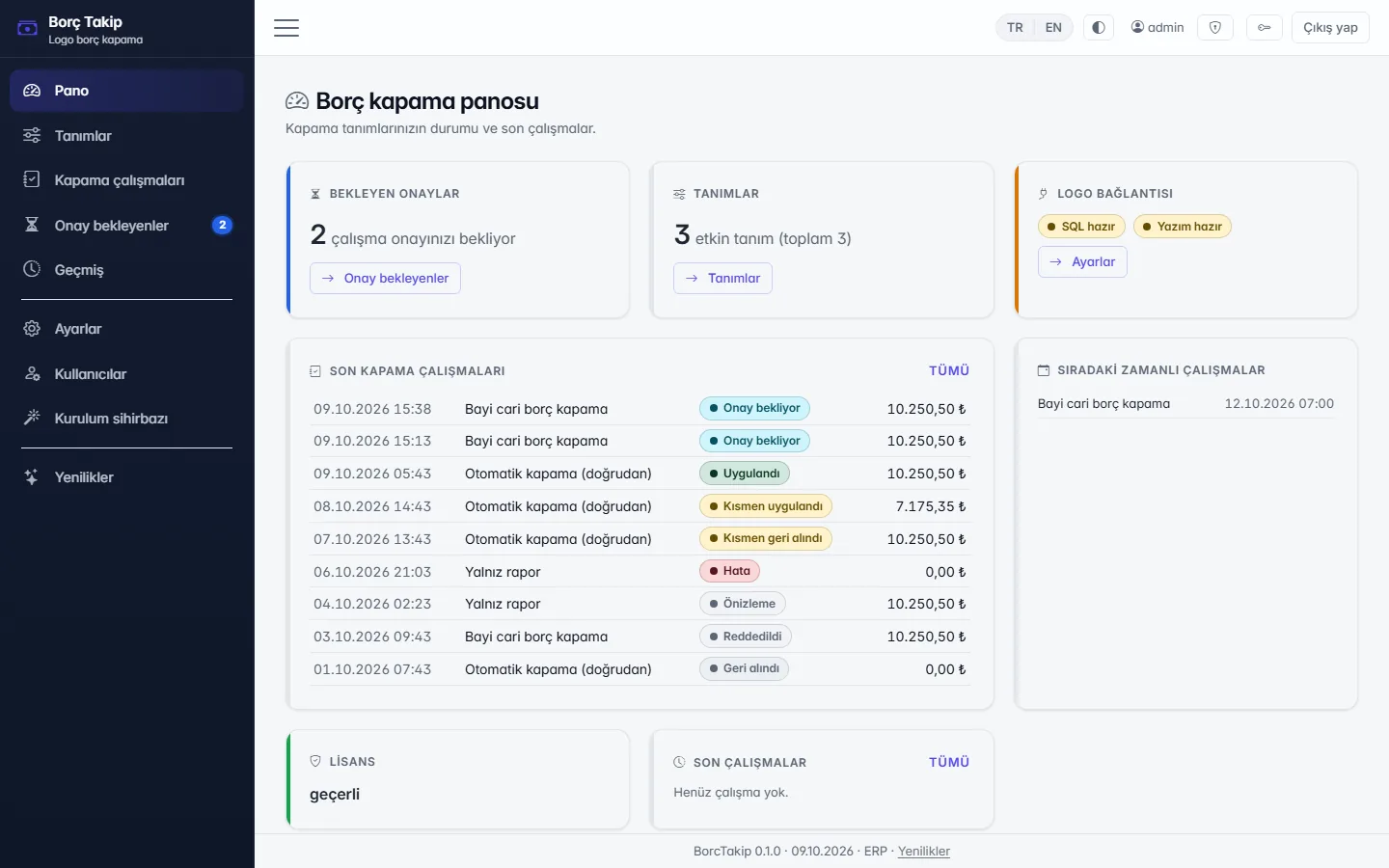
Dashboard: items queued for sign-off, latest closing passes, forthcoming timetabled passes (fictitious sample data)
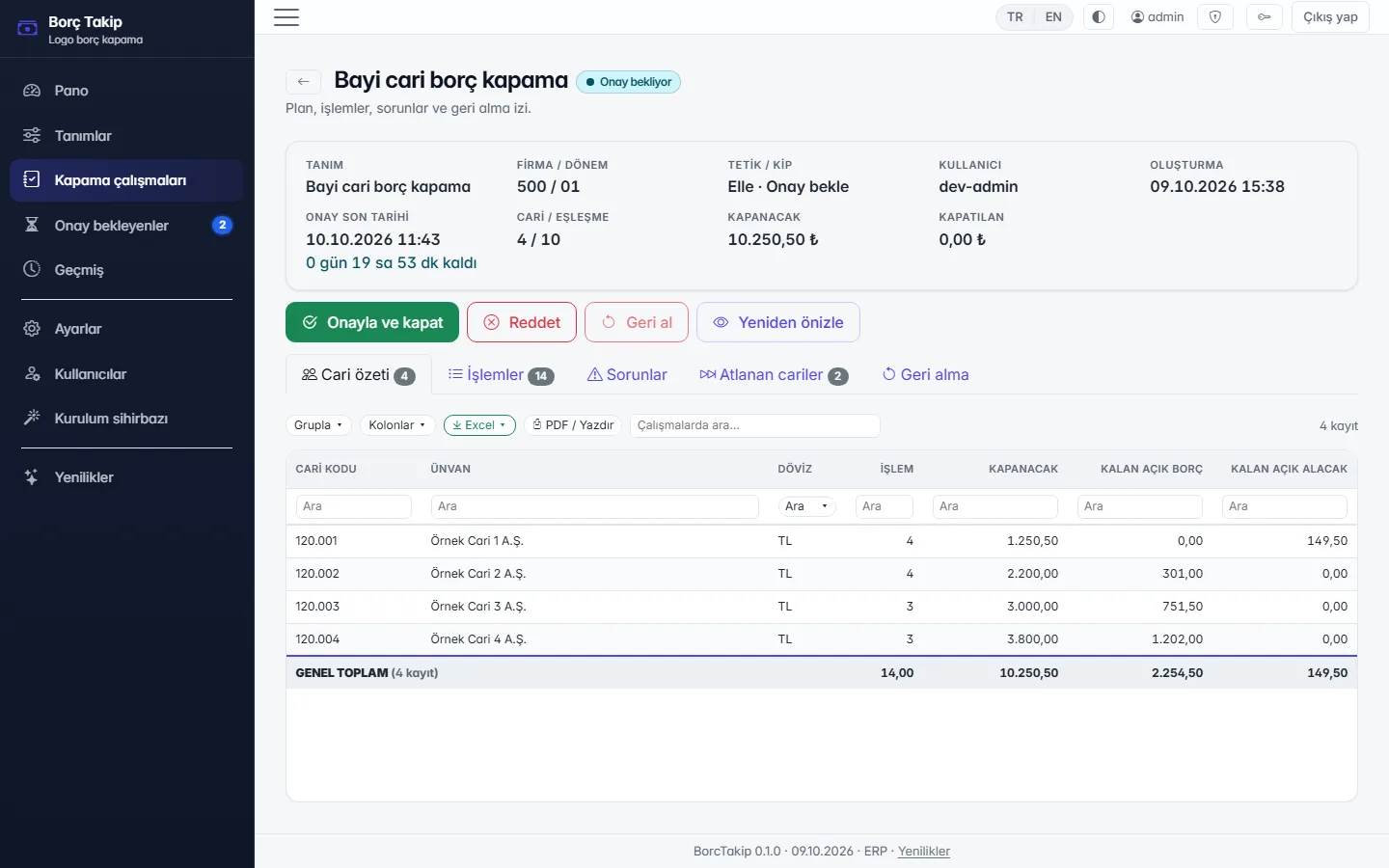
Pass sent for sign-off: account summary, amount to settle and balances still open (fictitious sample data)
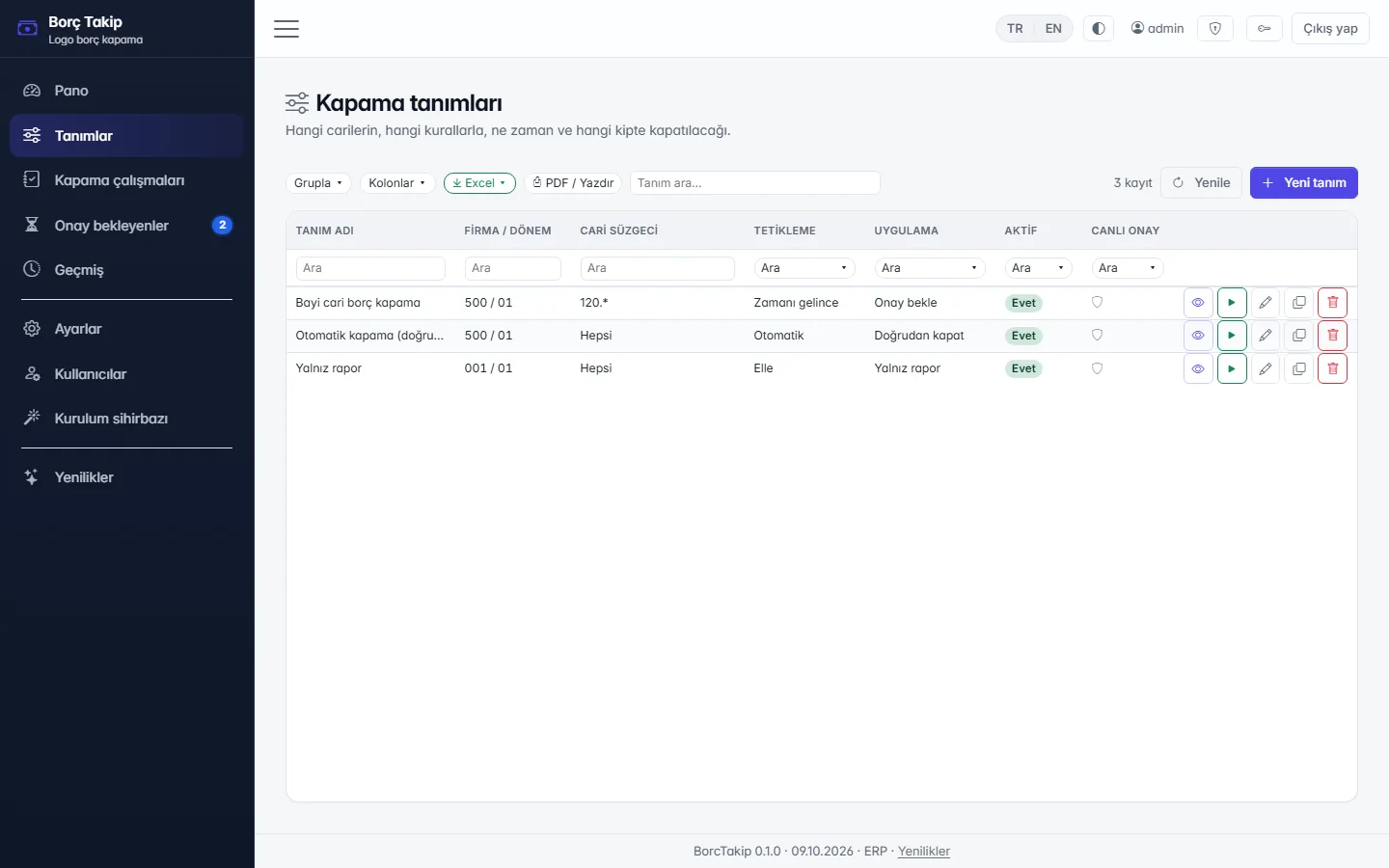
Closing definitions: criteria, trigger and apply mode (fictitious sample data)

Today vs. with ADR Debt Tracker

Settling debts each month

Today (manual / spreadsheets)Invoices already collected remain open; settling eats hours of manual effort each month and the ageing report stays inaccurate.

With ADR Debt TrackerEntries picked out by account code, group, special code, date and currency get their plan previewed account by account; closing follows a timetable or starts itself once fresh candidate entries appear.

Writing with care

Today (manual / spreadsheets)Following a bulk run nobody can say what shifted; fixing a bad match is tough.

With ADR Debt TrackerThe plan is refreshed from Logo at the moment of sign-off; settling happens via Logo Objects with Logo's native FIFO function, with nothing written to the database directly. On TRY accounts a reversal is checked document by document against how things stood beforehand.

Reports and leftovers

Today (manual / spreadsheets)Entries that failed to settle slip by; outcomes get forwarded by e-mail one at a time.

With ADR Debt TrackerExcel/PDF reports and e-mail are prepared on their own; lines left unsettled are listed together with the reasons.

Frequently asked questions

Is it writing straight into the Logo database?
It is not. Candidate entries are merely read from the database; settling happens via Logo Objects with Logo's native FIFO closing function, exactly as if you closed by hand inside Logo. The Logo user and Logo licence details are supplied during installation.
Can I reverse a mistaken closing?
On TRY accounts, pass by pass, yes: that pass's closings are reversed from last to first and the outcome is checked document by document against how things stood beforehand. Should a new entry have hit the account after closing, the account is not touched and a manual review is suggested. Logo retains the closing date and history record when reversing. Undo for foreign-currency accounts is not available in this version.
Will it settle foreign-currency accounts as well?
It will once you tick «also close foreign-currency accounts» in the definition; that option is off by default. While currency separation is active, every currency pairs up only within itself, and TRY is never blended with other currencies.
What does installation involve, and can I test it first?
Grab the installer from this page and launch it on a Windows server able to reach Logo. The wizard sets up the Windows service, then requests the Logo link and the first definition in sequence. A 15-day trial licence begins on its own; no licence is required for preview.
How much is it?
The product is currently in early access; ask the ADR team for a quote using the form below.

Keep me informed

ADR Debt Tracker is not released yet. Shall we email you when it launches, or give you a call? Choose your channel.

How would you like to be informed? (one or both)

Apply for early access

The product is in pilot. Apply and we will share the early-access terms and pricing with you directly.

Ideas and suggestions

Would you like a feature in ADR Debt Tracker, have a suggestion or hit a problem? Tell us; the team reads every message and shapes the roadmap accordingly.

Type

Name and email are optional; leave an email if you would like us to get back to you.