Our Products

AdrKampus — Campus Management

ADR Kampüs creates the Logo account card as each student is registered, runs the tariff and discounts when the term enrolment is made, books the fee immediately, passes the invoice to Logo and offsets payments against what is owed.

Why AdrKampus — Campus Management?

The problem

Fees worked out in spreadsheets, invoices kept in Logo, payments sitting at the bank

  • As each semester opens, fees are worked out manually in workbooks and scholarship or discount percentages become muddled between students.
  • Account cards and invoices go into Logo individually; coding and tax-detail mistakes only come to light once the semester closes.
  • Transfers and card payments are tied to students later on, so nobody can say with certainty how much a given student still owes.
Our answer

A continuous path from registration to balance

  • Creating or amending a semester registration works out the fee from the tariff and reductions and books it straight away; no separate accrual run is needed.
  • Account cards and autumn/spring invoices are checked and then pushed to Logo in batches.
  • Payments are recorded with their method and account and a receipt is printed; the per-student statement and balance report stay up to date at all times.

What sets us apart

Built around student accounting from the start

  • A genuine tariff structure: the amount depends on intake year, department, payment method, validity window and semester; autumn and spring are handled separately.
  • Stacked reductions: each scholarship or discount is worked out on the amount remaining after the earlier one; you can reorder them and the net figure can never drop below zero.
  • Keeps a record: each edit lands in the audit log; removed records are only flagged and can be brought back.

Key features

Step-by-step registration

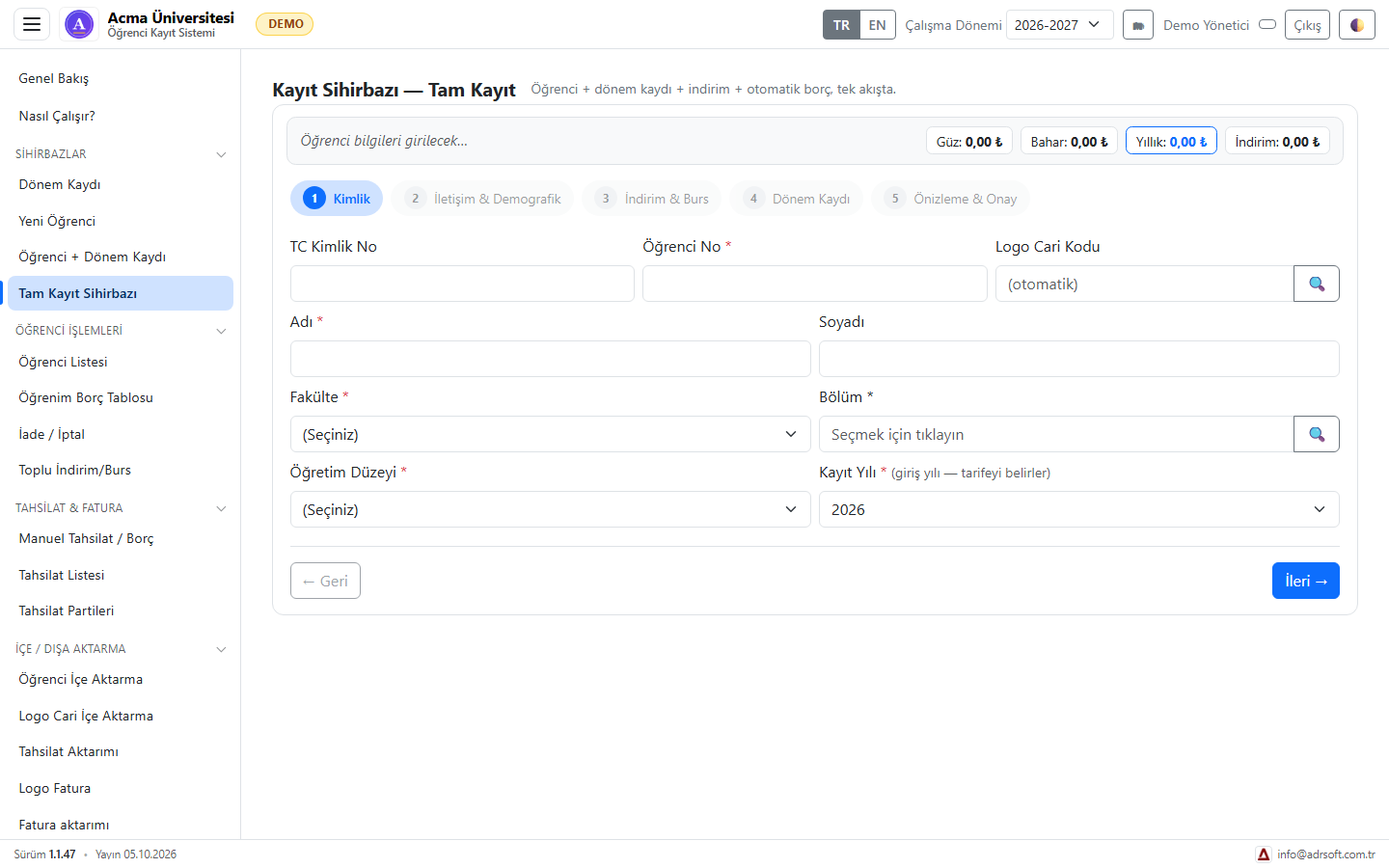
A new student, a semester registration or the two together: identity, contact details, scholarships and discounts, semester registration and a final review, with autumn/spring/annual figures updating instantly.

Tariff management

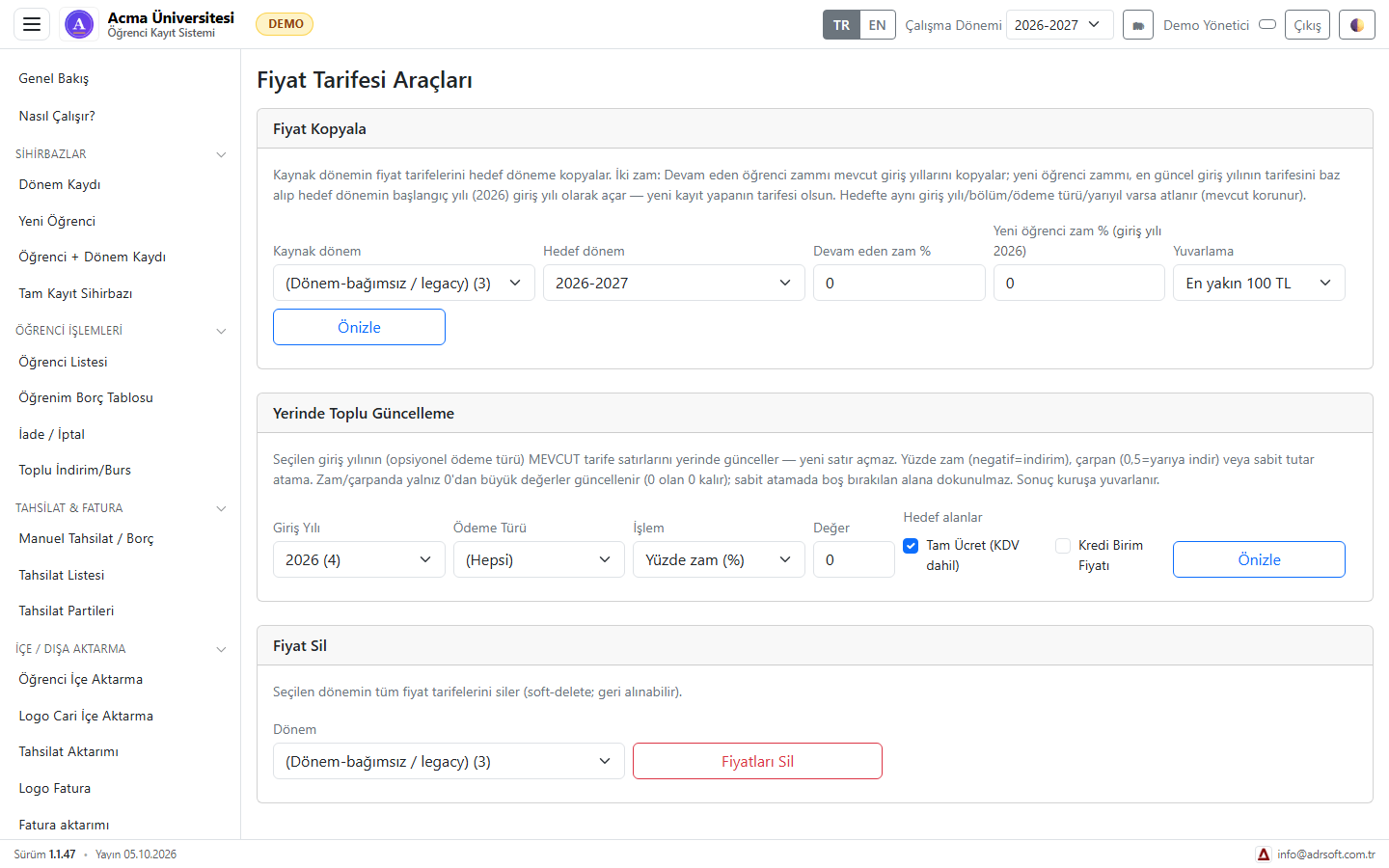
Next semester's tariff is duplicated from the last one, adjusted in bulk on the spot by a percentage with rounding, and a mistakenly created term is deleted at once.

Scholarships and reductions

Sibling, prompt-payment and merit reductions stack one after another; to give a scholarship or discount to many students you paste their numbers and review the outcome first.

Account cards and invoices in Logo

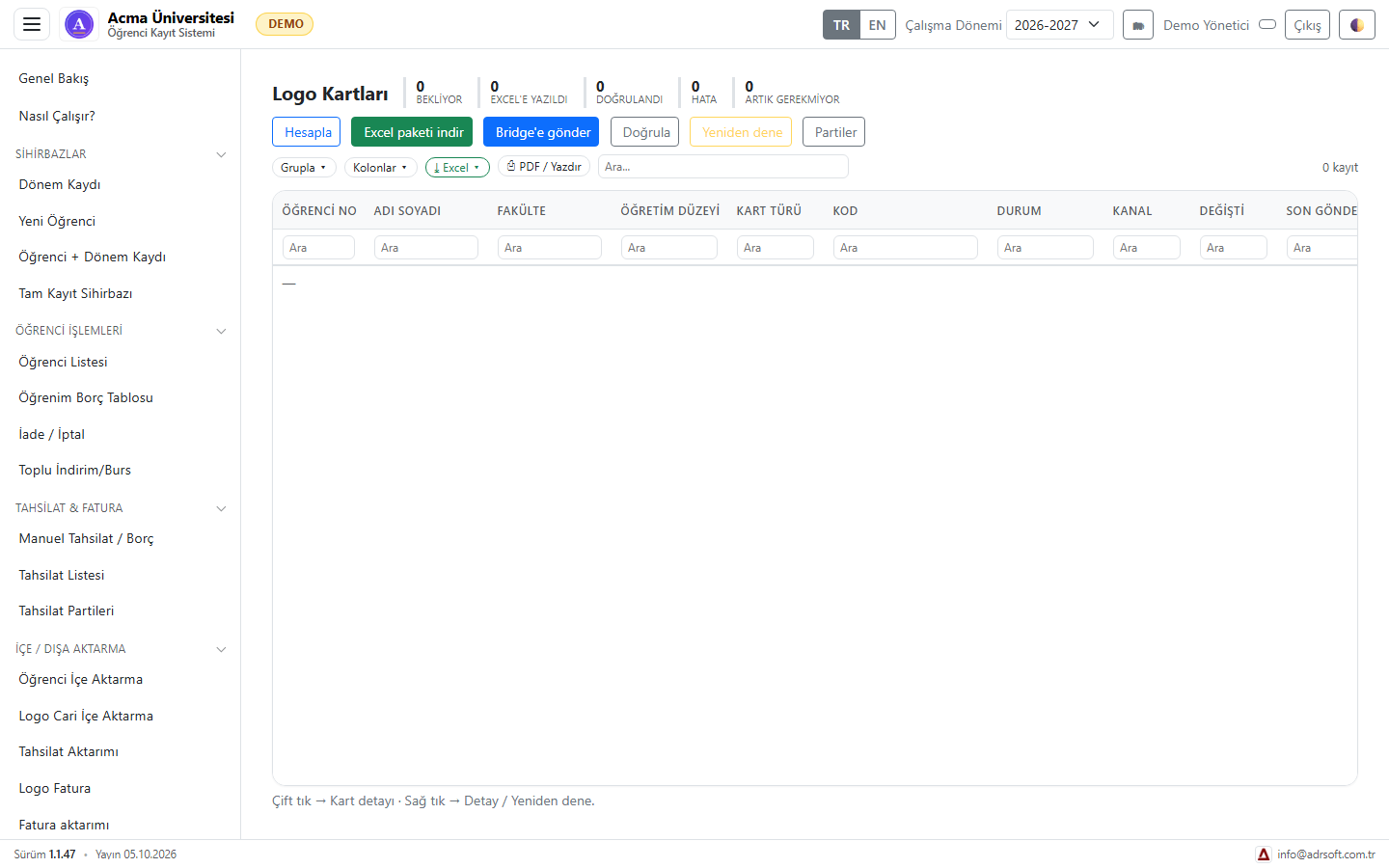
Account cards and fee invoices reach Logo straight or through Bridge; you see each card's state, any failure and a resend option together.

Payments and receipts

Payments by transfer, card and other means; receipts numbered in sequence, payment batches and file import. Refunds and withdrawals have their own screen.

Statements and balances

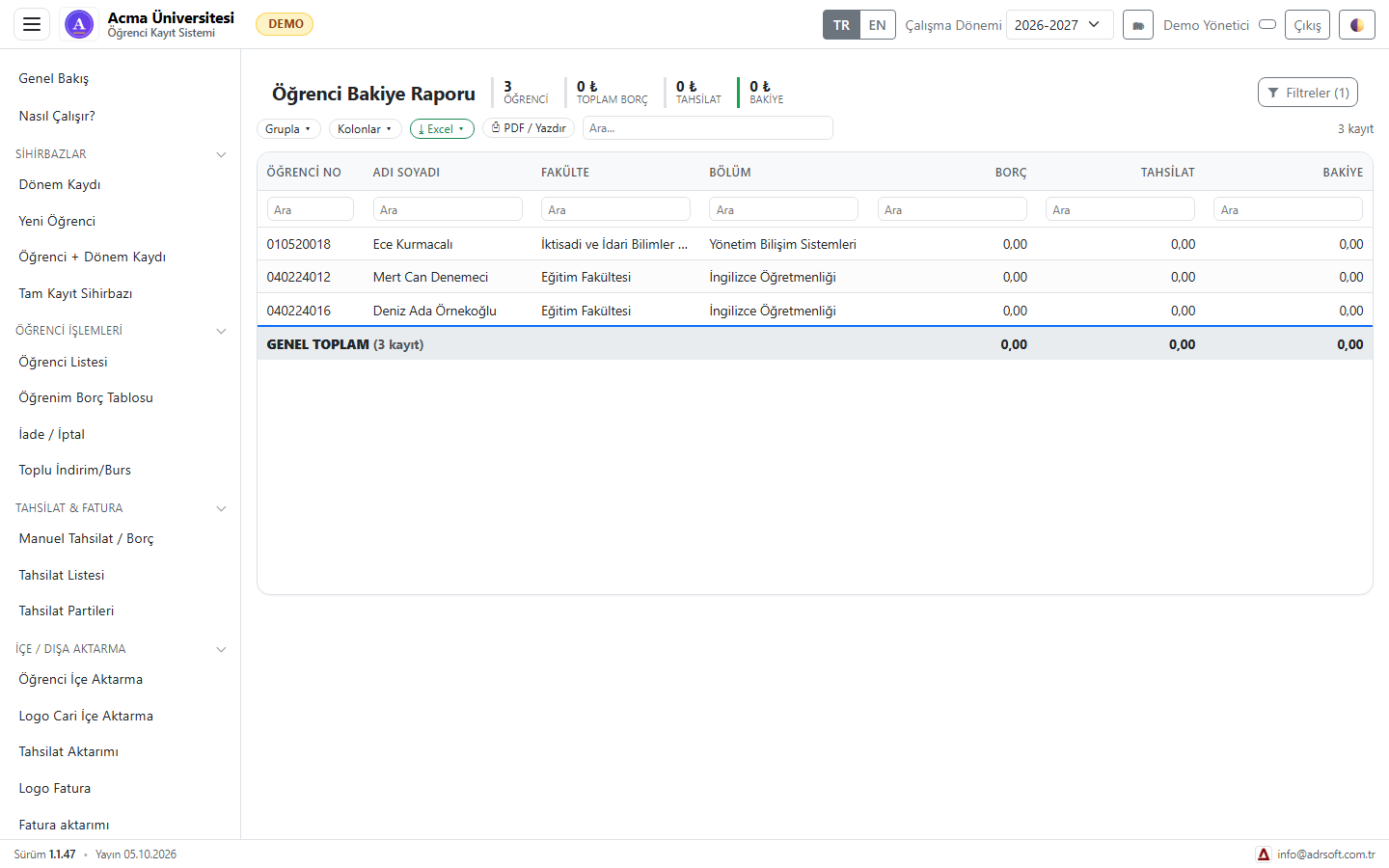
Fees, payments and balance for each student; grouped by faculty and department, exportable to Excel and PDF. An in-app guide walks through the process stage by stage.

Product details

Intended usersStudent affairs, finance and accounting offices at private universities and schools
AccessBrowser interface; Windows service on your institution's server
Setup / usageSetup wizard: database, Logo company/period, administrator; data migration by our team
CompatibilityLogo Tiger (account card and invoice transfer, direct or via Bridge); SQL Server
Licence scopeLicensed per institution; scope and quote on request
Version1.1.47

Screenshots

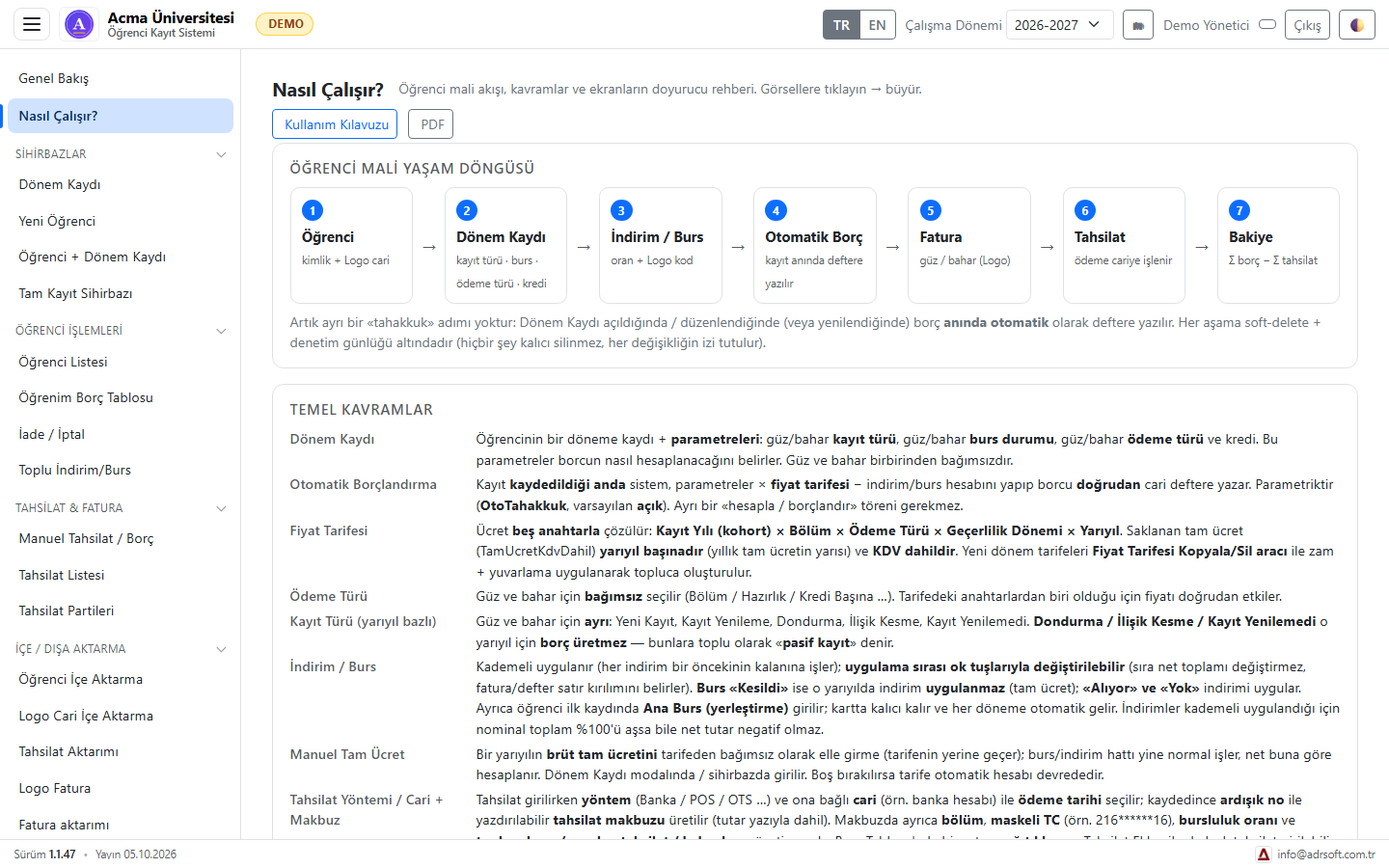
How a student's finances flow end to end, with the main terms (fictitious demo data)
The complete registration wizard, autumn, spring and annual figures updating instantly (fictitious demo data)
Per-student balance statement: fees, payments, remaining (fictitious demo data)
Tariff management: duplicate, adjust in bulk, remove
Logo cards: push through an Excel package or Bridge, then check

Today vs. with AdrKampus — Campus Management

Fees as the semester opens

Today (manual / spreadsheets)Amounts are worked out manually in workbooks; scholarship and discount percentages become muddled.

With AdrKampus — Campus ManagementAs soon as a semester registration exists, the fee is worked out from the tariff and stacked reductions and booked.

Account cards and invoices in Logo

Today (manual / spreadsheets)Each account and invoice goes into Logo individually; errors only come to light once the semester closes.

With AdrKampus — Campus ManagementCards and autumn/spring invoices are checked and pushed in batches; each card's state and failure appear together.

Payments and balance

Today (manual / spreadsheets)Transfer and card payments are tied to students later on.

With AdrKampus — Campus ManagementEach payment is recorded with its method and a sequence-numbered receipt; fees, payments and balance are visible for every student.

How does pricing work?

Pricing depends on the modules you use and on the number of users and companies. Try it free first or ask for a short live demo; once the scope is clear, we send a written quote.

  • We are with you during installation and initial setup.
  • No credit card or payment details needed for the trial.
  • The quote states the scope, number of users and support period clearly.

Frequently asked questions

Which records end up in Logo?
Account cards plus autumn and spring fee invoices; every transfer is checked beforehand, the state of each card is followed and failures may be sent again. Fees, payments and balances keep running when there is no Logo link at all.
How do we move our current student records across?
Student lists, Logo account cards and earlier payments are loaded from Excel files via dedicated import screens, and any rows that cannot be matched are listed while loading. Our team carries out the first load alongside you.
Where do our records live?
On a server belonging to your institution, inside your SQL Server database. The software operates as a Windows service and is opened in a web browser across your internal network.
How is it priced?
Our quote reflects how large your institution is, how many students you have and how much data must be moved. Look through the demo first, then fill in the form further down this page.

See it for yourself

Try the whole flow with a demo account on a fictional company's data; nothing is written to your real systems. Then we will prepare a quote for your needs.

Keep me informed

Choose how you would like to hear about AdrKampus — Campus Management: news by email, or a call from us.

How would you like to be informed? (one or both)

Trial, demo or quote

What would you like?

Ideas and suggestions

Would you like a feature in AdrKampus — Campus Management, have a suggestion or hit a problem? Tell us; the team reads every message and shapes the roadmap accordingly.

Type

Name and email are optional; leave an email if you would like us to get back to you.