Our Products Coming soon

KYAK

Lay out your data, entry screens and navigation; listings, voucher entry, change logs and access rules are built in. Still being built — share your contact details for early access.

Why KYAK?

The problem

Modest requirements become major undertakings

  • Processes kept in spreadsheets: nobody knows which file is current or who edited it.
  • Software efforts stretching over months, even for a simple business tool.
  • Yet another program for every flow that falls outside your ERP.

Our answer

Model it, go live, get to work

  • Set up data structures, their links, entry screens and navigation in the designer and take them live.
  • Listings, filtering, Excel/PDF output, voucher entry and change history are included from the outset.
  • Roles and groups let you control which person can view or edit each thing.

What sets us apart

A database of your own, voucher screens you already know

  • In cloud use, each organisation has its own database; your records never sit in the same table as another firm's.
  • Voucher entry shaped by ERP habits: a line grid, F2 for lookup, F10 to store, committed in a single transaction.
  • What is usable now and what is queued is listed openly here; a roadmap in place of calendar commitments.

Key features

Studio designer

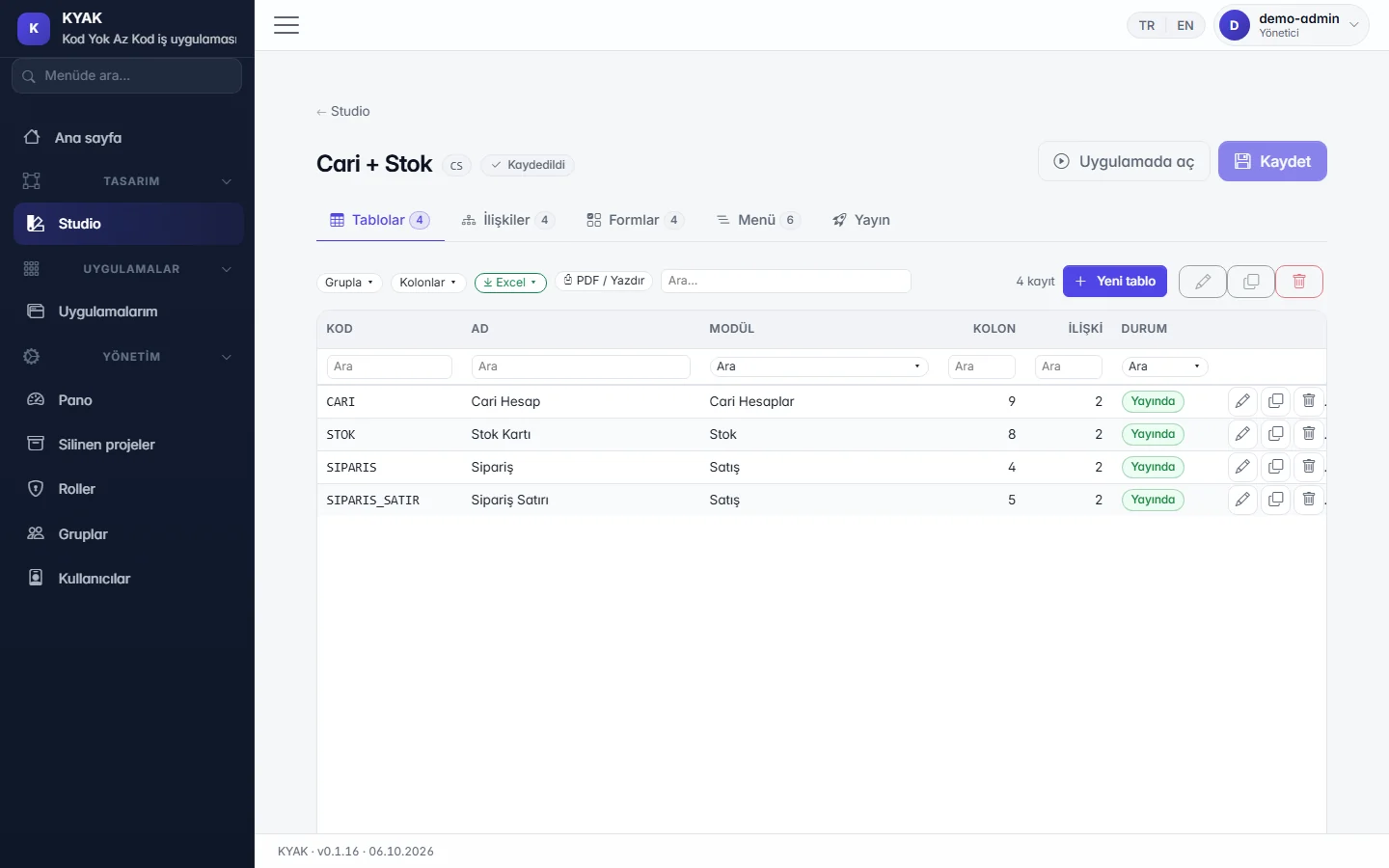
Data structures, fields, links, entry screens and navigation in a single window; edits wait as a draft until you take them live.

Drag-and-drop screen layout

Place and size fields with the mouse; check the computer, tablet or mobile view.

Listings and vouchers out of the box

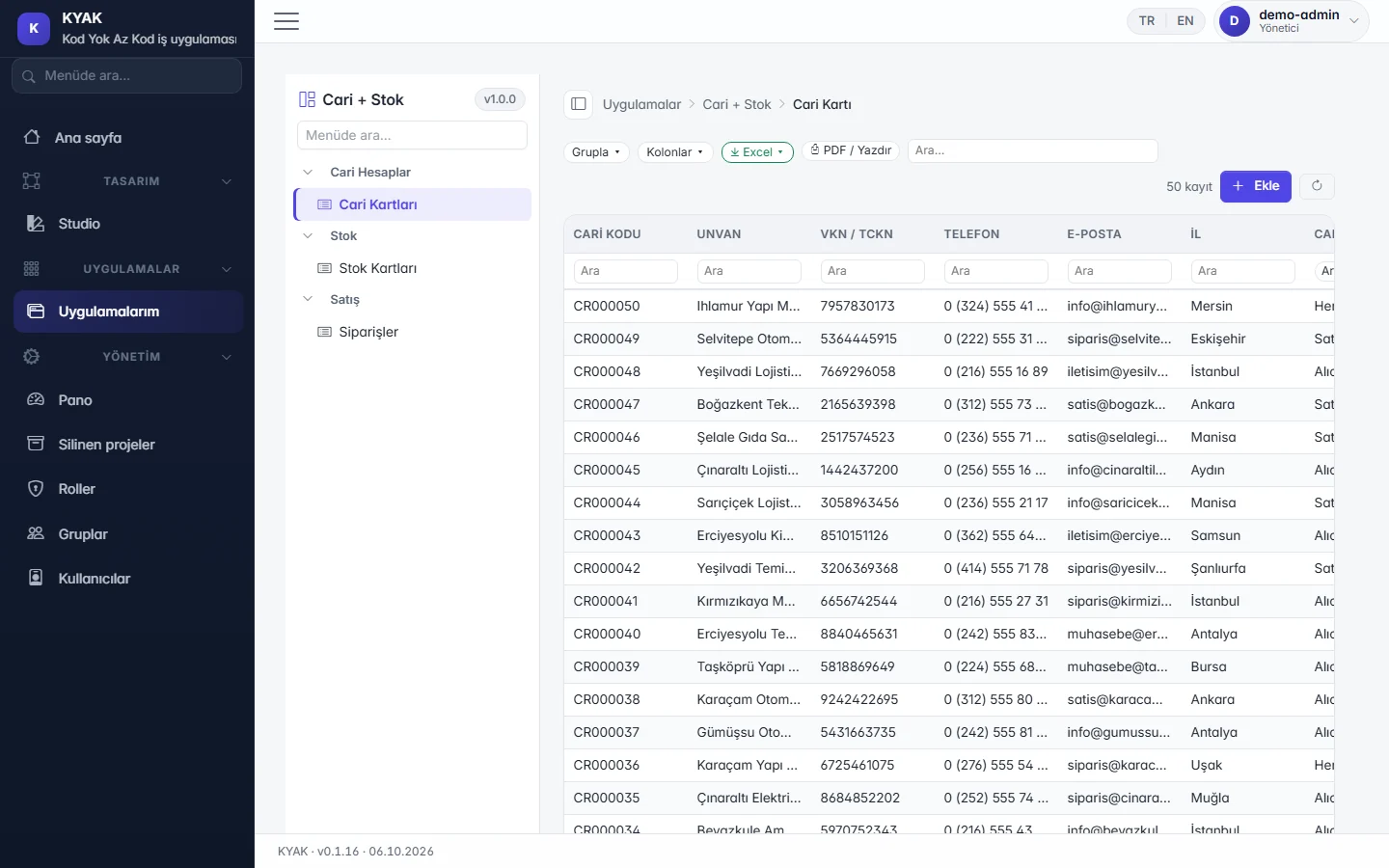
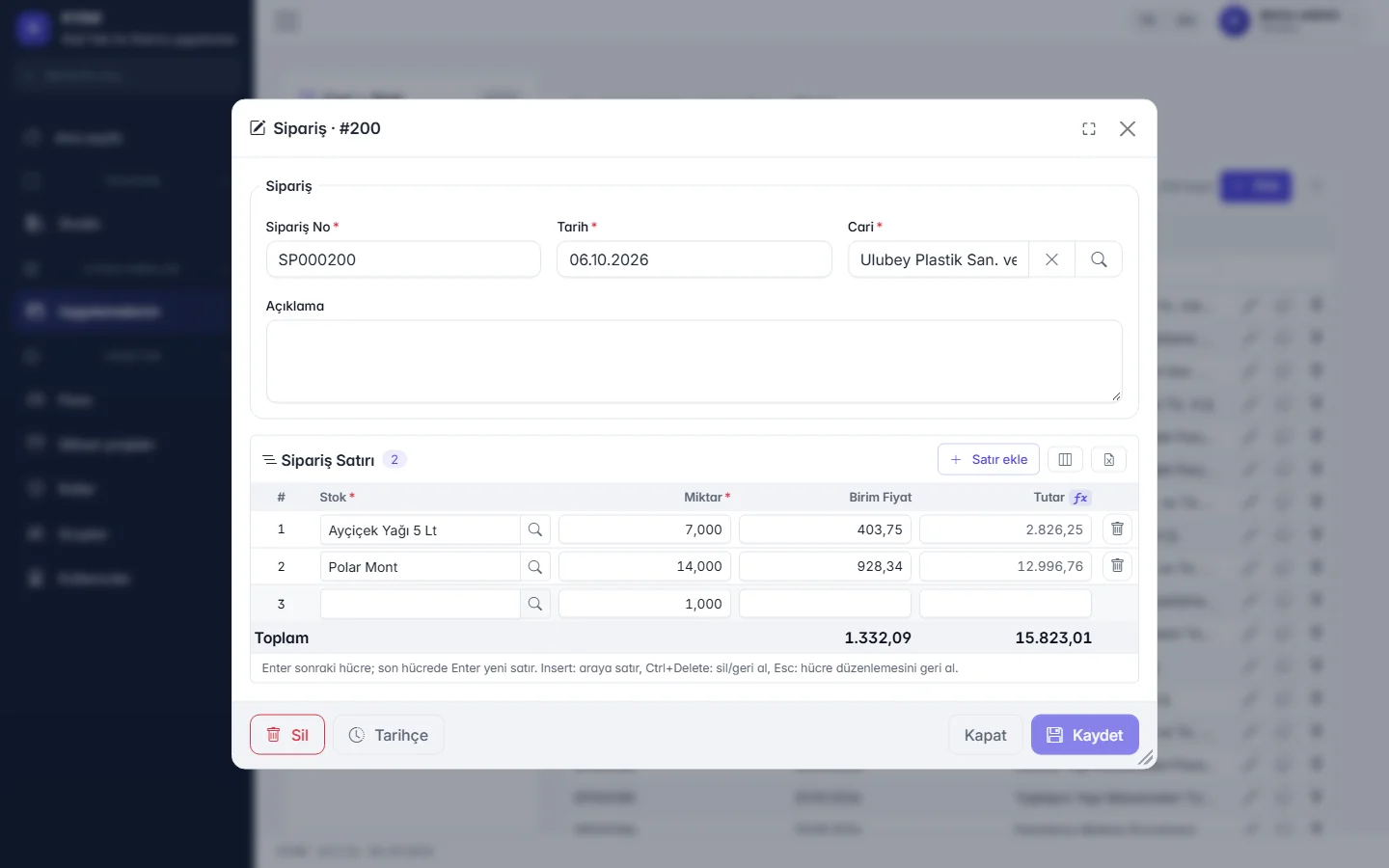
Each data structure gets a listing with filtering, grouping, column choice and Excel/PDF output; header-and-lines vouchers use F2 for lookup, F10 to store and a single transaction.

Calculations, rule checks, auto-numbering

Build line amounts, sums and conditions with the formula helper; rules are tested prior to storing, and voucher numbers are assigned from a pattern.

Change log and access control

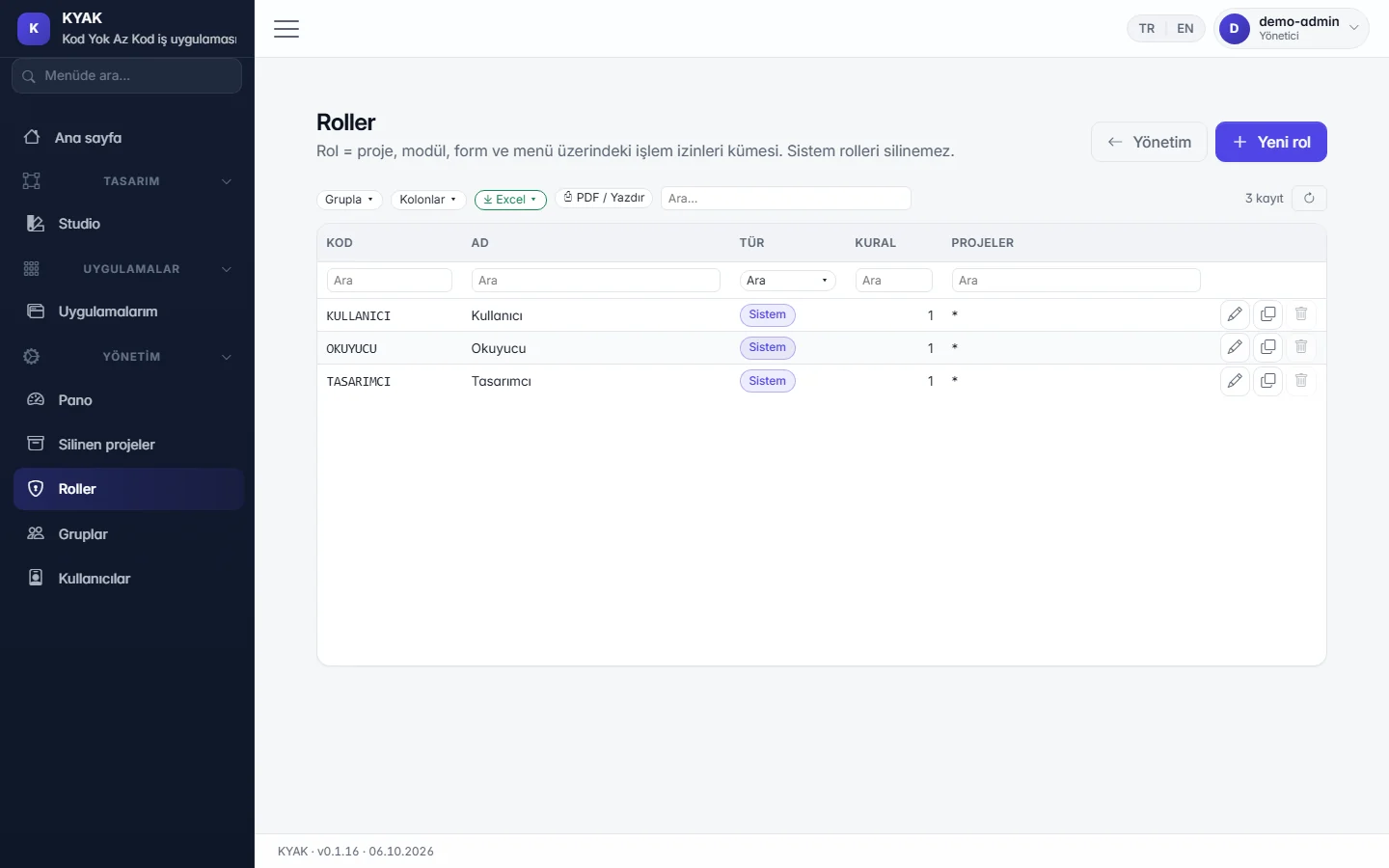
The system keeps who edited every record and at what moment; project, screen and menu access via user, group and role windows, plus limits at field and record level.

Excel in the loop

Send listings to Excel as genuine numeric values; grab a blank template, complete it, load it in bulk with checks and roll the load back if required.

Commercial starter pack

Basic modules like customer accounts, inventory and orders are supplied as a starting template that you grow as needed.

Hosted or on your own servers

When hosted, every organisation has a separate database; the on-premises package is set up through a wizard and records remain in your own SQL Server.

Product details

Intended usersBusiness units, ERP consultants and dealers, IT teams
AccessBrowser interface; cloud (SaaS) or on-premises installation
Setup / usageAn account is opened in the cloud; the on-premises package installs with a wizard (pilot customers)
CompatibilitySQL Server; a separate database for each tenant
Licence scopeIn development; terms are shared during early access

Screenshots

Studio: data structures, links, entry screens, navigation and going live (fictitious demo data)
Listing view in the live app: filtering, grouping, columns, Excel/PDF (fictitious demo data)
Voucher screen: header plus lines, amounts and sums calculated by formula (fictitious demo data)
Access management: roles, groups, users

Today vs. with KYAK

Processes outside your ERP

Today (manual / spreadsheets)The process lives in Excel workbooks; as copies pile up it becomes unclear who is editing which version.

With KYAKYou lay out the data structures, links, entry screens and menus yourself and take them live; the process is gathered into a single application.

Listings and reporting

Today (manual / spreadsheets)Filtering, grouping and output are prepared manually for each workbook.

With KYAKListings arrive ready to use with filtering, grouping and Excel/PDF output.

Voucher entry and access rights

Today (manual / spreadsheets)Header–line vouchers sit on different sheets; edits cannot be traced to a person.

With KYAKHeader–line voucher screens, change history and role-driven access are included from the outset.

Roadmap

We show openly what is ready, what is in development and what comes next. We do not promise dates; your feedback sets the priorities.

Frequently asked questions

Has the product name been settled?
Not yet; the name in use is provisional and could differ at release. Even if it changes, the link to this page will not.
When will it be available, and how much will it cost?
Because the product is still being built, we make no commitment on timing. Put your contact details in the form below and we will reach out during the early-access phase. Pricing will be shared at that stage.
Is it hosted, or can I set it up on my own server?
Both options are intended. With hosting (SaaS), every organisation's records sit in a separate database. On-premises, all records remain in your SQL Server; the package is set up through a wizard and is offered to pilot users.
Is programming knowledge required?
Setting up data structures, entry screens and navigation requires no code. Calculation and checking rules are built in the formula helper by choosing items from a field list.
Can I build an app from my Logo database?
Reading the tables of an ERP database you already have to create a starting project is listed as «Planned» on the roadmap. At present, projects are set up in the Studio designer.

Product brochure

Download a two-page PDF brochure about the product to share with your team.

Keep me informed

KYAK is not released yet. Shall we email you when it launches, or give you a call? Choose your channel.

How would you like to be informed? (one or both)

Ideas and suggestions

Would you like a feature in KYAK, have a suggestion or hit a problem? Tell us; the team reads every message and shapes the roadmap accordingly.

Type

Name and email are optional; leave an email if you would like us to get back to you.