
Logo TCMB Kur
A Windows service that feeds central bank rates to Logo ERP and enrolls with the licensing center by itself.
Key features
Schedule it your way
Fetches rates every day at a chosen hour (06:00 out of the box) or every few minutes, and handles the target day as soon as the service comes up.
The 15:30 rule and looking back
The bulletin TCMB issues at 15:30 covers the following day; over weekends and bank holidays it looks back as many days as you allow.
Controlled writes, easy undo
Operates either insert-only or update-existing; a copy of what each run put into Logo is kept and can be reverted with one click, and rows someone later edited manually are left alone.
Matching rate columns
Every currency code the bulletin lists can be handled; in the setup wizard you decide which TCMB value (forex or cash, buy or sell) lands in which Logo RATES column.
E-mail alerts
Fetched rates go out as an HTML table, optionally with an Excel or CSV file attached; any bulletin kept in the archive can be mailed manually too.
Check report
At the hour you set it confirms the target day's rates reached Logo in each chosen company, and mails a list of anything missing grouped by company and code.
Download
Download Download the setup wizard (.exe)
Permanent link to this version:
https://tcmbkur.adrsoft.com.tr/dl/logo-tcmb-kur/1.6.6
Installation
- Extract the downloaded zip file into a folder.
- Right-click install.ps1 in that folder and choose “Run with PowerShell”; Windows will ask for administrator approval (UAC).
- When setup finishes, complete the wizard at http://127.0.0.1:<port>/kurulum, which opens in your browser.
The package is not digitally signed, so Windows SmartScreen may warn you: “More info” → “Run anyway”.
SHA-256f4750583b0dcce5455cfb03c5309a0c1dfa574fe71baffa7b024b64ba5358dcf
After downloading, verify the file is intact:
Get-FileHash .\TcmbKur-Logo-1.6.6-win-x64.zip -Algorithm SHA256
Screenshots
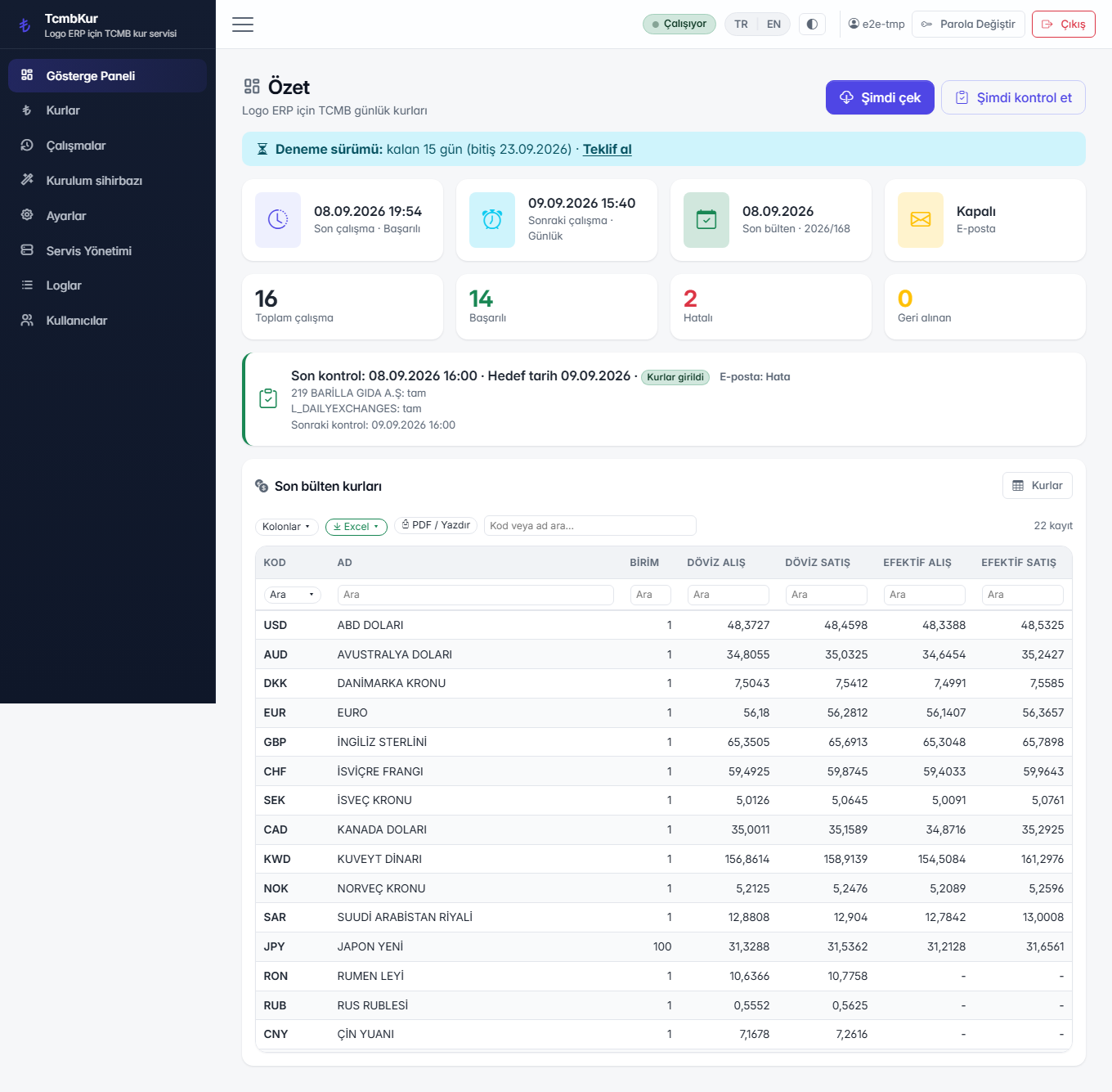
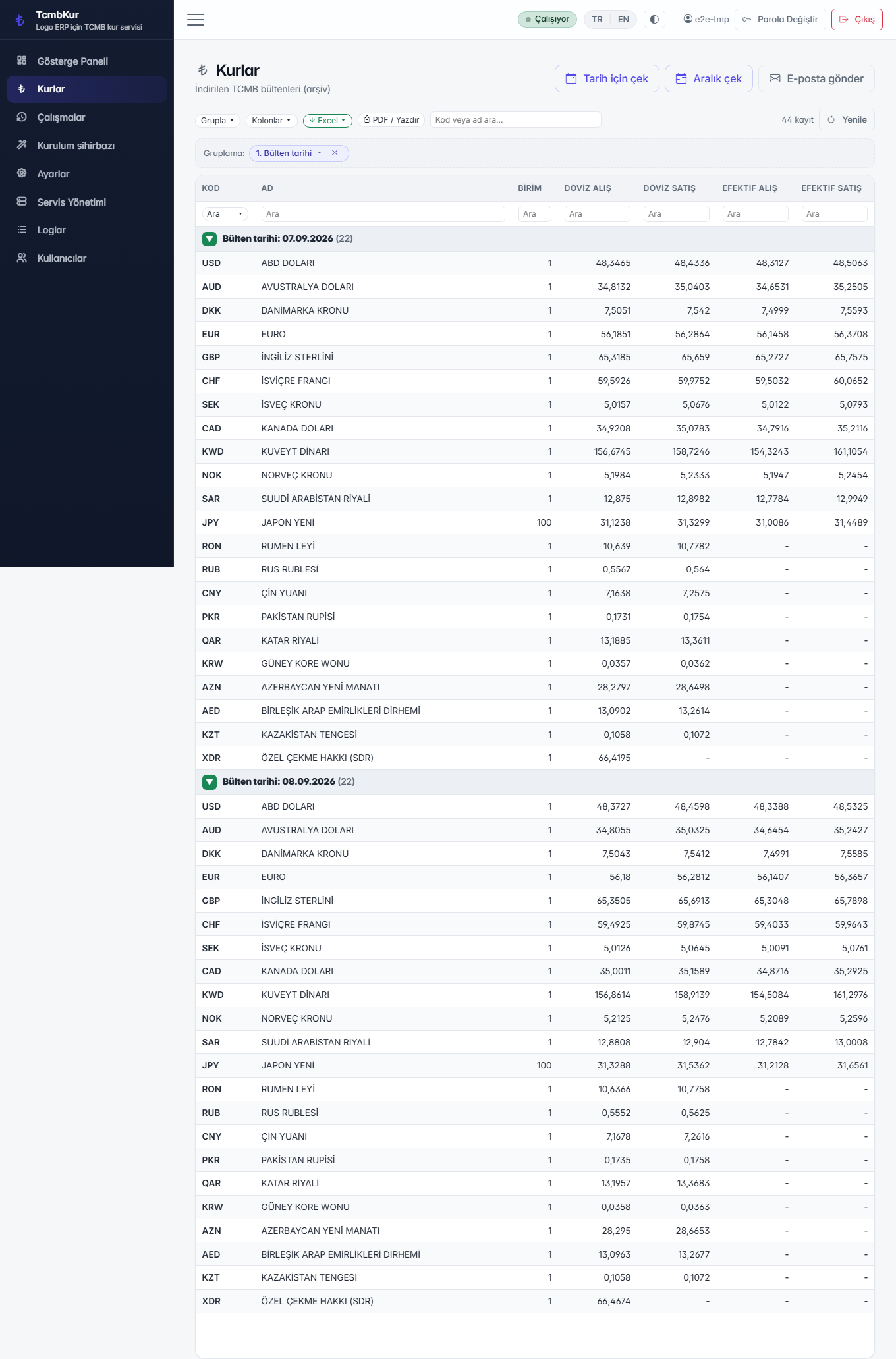
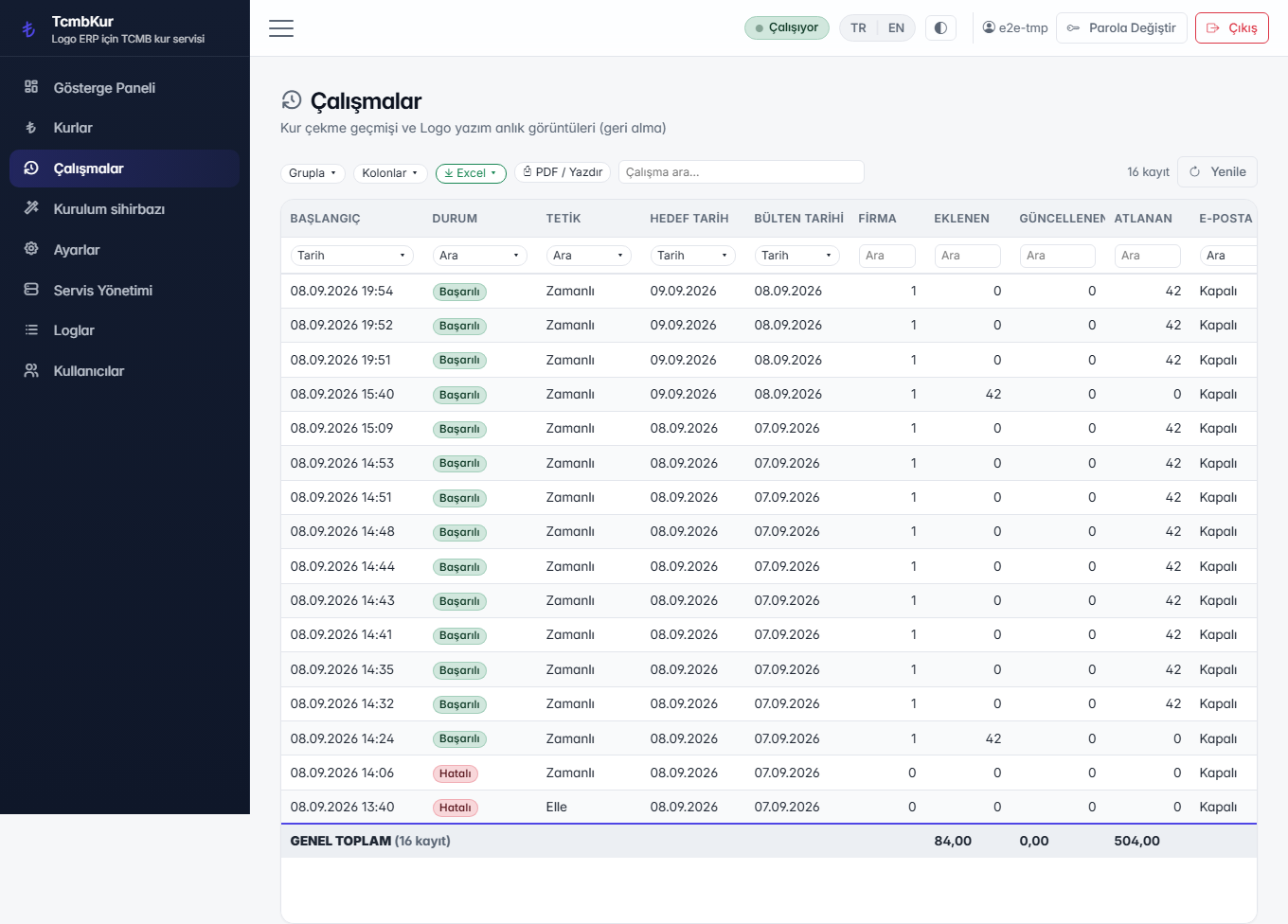
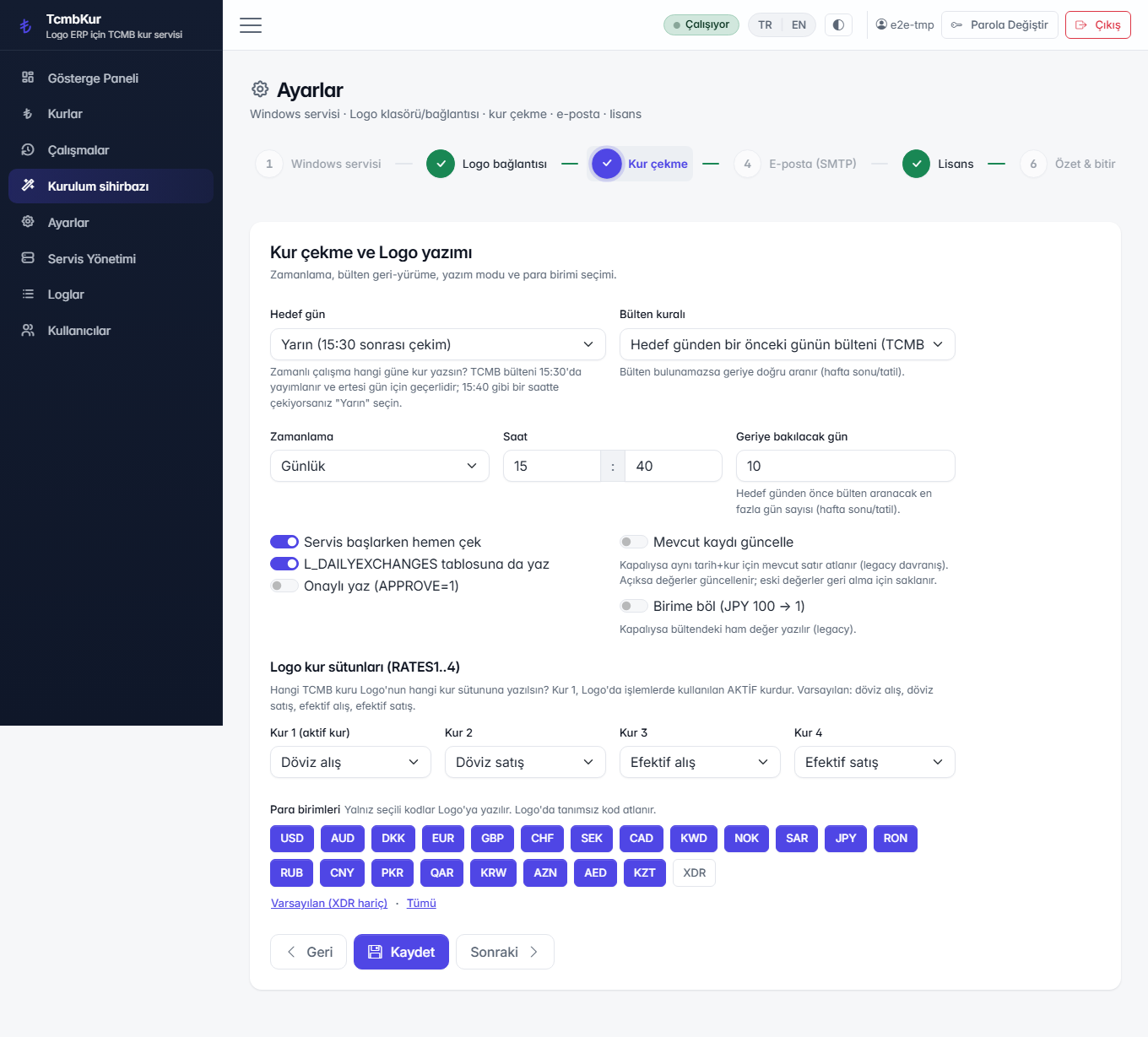
Today vs. with Logo TCMB Kur
Entering rates each day
Today (manual / spreadsheets)Each morning someone copies the figures from the central bank website and types them into Logo.
With Logo TCMB KurRates are fetched by a scheduled job and stored in line with the 15:30 rule and holidays.
Incorrect rates
Today (manual / spreadsheets)An incorrect figure ends up in vouchers until it is spotted.
With Logo TCMB KurStored under control, reverted with a single click.
Telling the team
Today (manual / spreadsheets)Someone forwards the figures to colleagues by e-mail.
With Logo TCMB KurAn alert carrying Excel/CSV plus a check report is mailed on its own.
How does pricing work?
Pricing depends on the modules you use and on the number of users and companies. Try it free first or ask for a short live demo; once the scope is clear, we send a written quote.
- We are with you during installation and initial setup.
- No credit card or payment details needed for the trial.
- The quote states the scope, number of users and support period clearly.
Install in 3 steps
-
1. Set up the package
install.ps1 (gains admin rights through UAC)
The install.ps1 found in the zip locates an unused port, builds the TcmbKur database, sets up and launches the Windows service, then brings up the setup wizard. When the application first opens it reports the installation to the licensing center itself.
-
2. Link to Logo
Wizard: SQL connection, companies, rate columns
Point it at Logo's SQL server and confirm with Test Connection, tick the companies that should receive rates, and pair each TCMB value with its RATES column.
-
3. Fetch the first rates
Summary step → Run first pull
On the Summary step that closes the wizard, the Run first pull button brings in the target day's rates at once; after that the service does its job unattended at the configured hour.
Frequently asked questions
How come today's figure is taken from the previous day's bulletin?
The bulletin TCMB issues at 15:30 covers the following business day, which means the target day relies on the one published a day earlier. Over weekends and bank holidays it looks back until it reaches the latest business day.
How come a certain currency code never reaches Logo?
A code has to exist in the L_CURRENCYLIST table of Logo; any that are missing there get passed over, and the run details report how many.
A second pull for the same day added nothing — is this normal?
It is. Out of the box the mode is insert-only, so a row already present is left alone. Switch on Update existing record under settings and the figures get refreshed instead, with the option of reverting that change later.
Alert e-mails never show up — where do I look?
Fire off a trial message under Settings → E-mail, look at the mail failure shown in the run details, then go through the application logs (/logs).
Is there a license key or API key to type in?
There is not. When it first starts, the application reports the computer to the licensing center with the status Pending. The agreed license is then allocated to that record from the center; the short code/QR on the setup screen merely helps locate the right entry.
Can the comma/dot decimal separator cause trouble?
It cannot. TCMB figures are read regardless of regional settings (with a dot as decimal mark) and passed to SQL Server as typed parameters, so values stay intact on a tr-TR computer as well.
Works well with
LOGO Power Bundle
A decision cockpit on your LOGO ERP data, no-code approval workflows and automatic Central Bank (TCMB) exchange rates.
All solution bundlesKeep me informed
Choose how you would like to hear about Logo TCMB Kur: news by email, or a call from us.
Trial, demo or quote
Ideas and suggestions
Would you like a feature in Logo TCMB Kur, have a suggestion or hit a problem? Tell us; the team reads every message and shapes the roadmap accordingly.