Our Products

Şirketinizin nabzını her sabah tek ekranda görün

LOGO ERP verinizden nakit, tahsilat, ciro, stok ve risk göstergeleri; rolünüze göre ve şirket şirket.

Why LogoKokpit?

The problem

Where executives fall behind

  • Liquidity and collection figures surface only once someone requests a printout from accounting.
  • Every unit keeps a private workbook, and the totals contradict each other.
  • A customer slipping on payments or inventory running dry gets spotted once the damage is done.

Our answer

What LogoKokpit gives you

  • It pulls in LOGO ERP records and presents prepared boards for the owner, finance, sales, inventory and collections.
  • It goes from a headline figure all the way to the voucher behind it.
  • It notifies you once a set limit is passed.

What sets us apart

What sets it apart

  • It never alters your Logo records; it only reads them.
  • Separate and combined views for groups running several companies.
  • Each user sees only the firms, sites or customer accounts they have been granted.

Key features

Finansal görünürlük

Nakit, alacak, borç, vade riski ve marjı tek bakışta görün.

Ticari performans

Satış trendi, hedef, müşteri, iade ve iskonto sinyallerini takip edin.

Stok ve tedarik

Kritik stok, devir hızı, ölü stok ve tedarikçi hareketlerini yönetin.

Collections and exposure

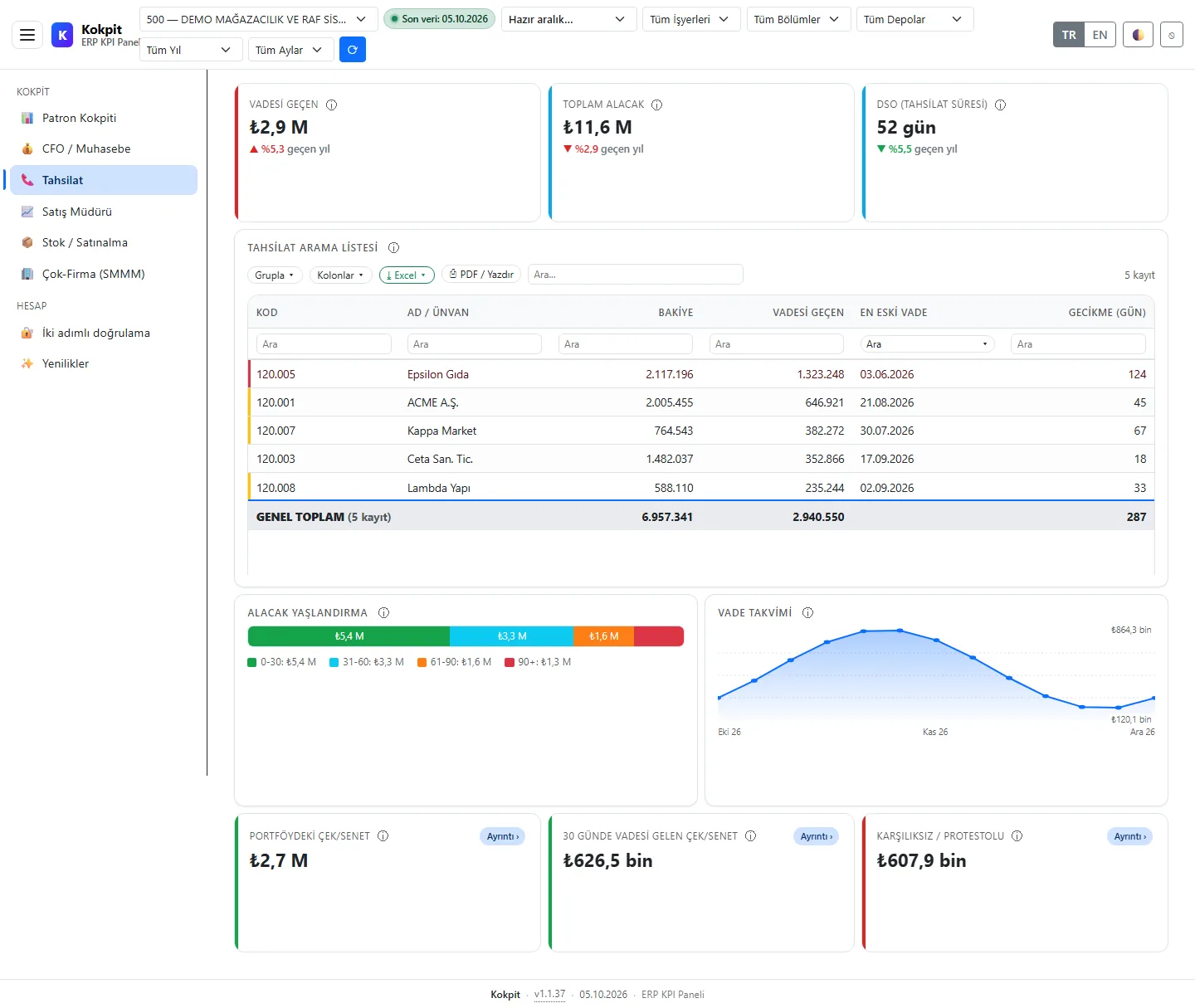
Late receivables, customer exposure and the cheque portfolio together on a single board, with limit warnings.

Five roles, five boards

Dedicated boards for the owner, CFO/accounting, sales, stock/purchasing and the accountant, so each person finds the answer they are looking for.

Every client firm for accountants

Set client firms against each other in a single grid using a risk score and direction line, and move the ones that need a look to the top.

Lists you can dig into

Lists like customer balances and dwindling stock can be grouped, ordered and narrowed, then taken out as Excel and PDF.

Your Logo records stay as they are

The Logo database is accessed for reading alone; queries follow fixed templates with parameters, and your database never has to face the internet.

Product details

Intended usersExecutives, finance teams and financial advisors
AccessInstalled on your server or hosted
Setup / usageInstallation and initial setup by our team
CompatibilityLOGO ERP (Tiger and Go families)
Licence scopeBased on the number of companies and users

Product documentation

Overview

Liquidity, open receivables, due-date exposure, profitability, sales direction and stock warnings, laid out for owners, finance, sales and warehouse staff.

Owner view

The full business picture on one page

  • Turnover: for today, the current month and since the start of the year.
  • Cash (real time), open receivables, late receivables, profitability and inventory worth.
  • A chart of sales direction, biggest buyers and fastest-moving products.
  • Receivables ageing: instantly see how far behind every amount owed is.

Finance lead and accounting

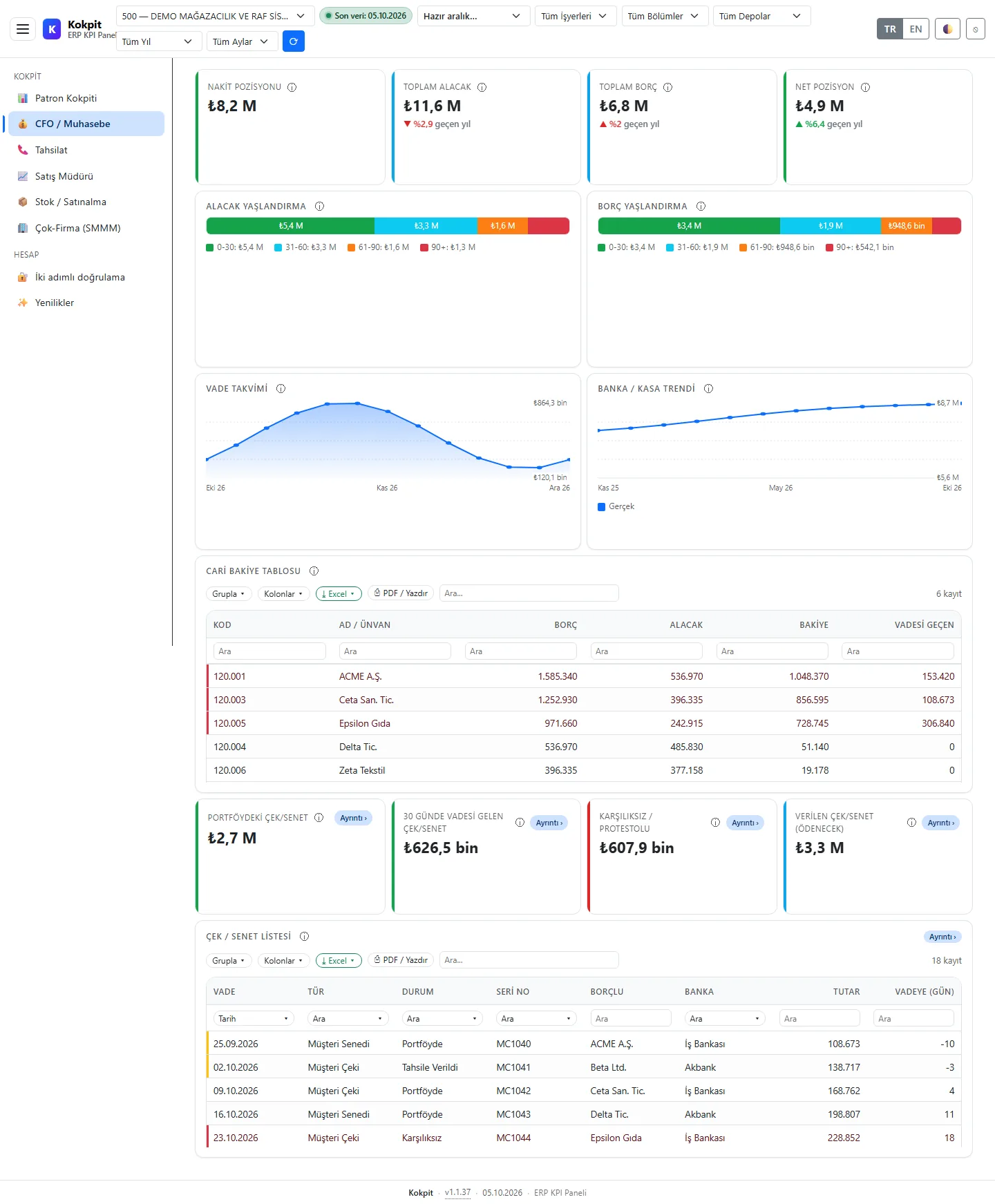
  • DSO (average days to collect); amounts owed in and out, plus the net figure.
  • Ageing grids for receivables and payables, with a payment calendar.
  • Bank and cash direction over time.
  • Customer balance list: grouping, ordering, narrowing and Excel/PDF.

Sales team

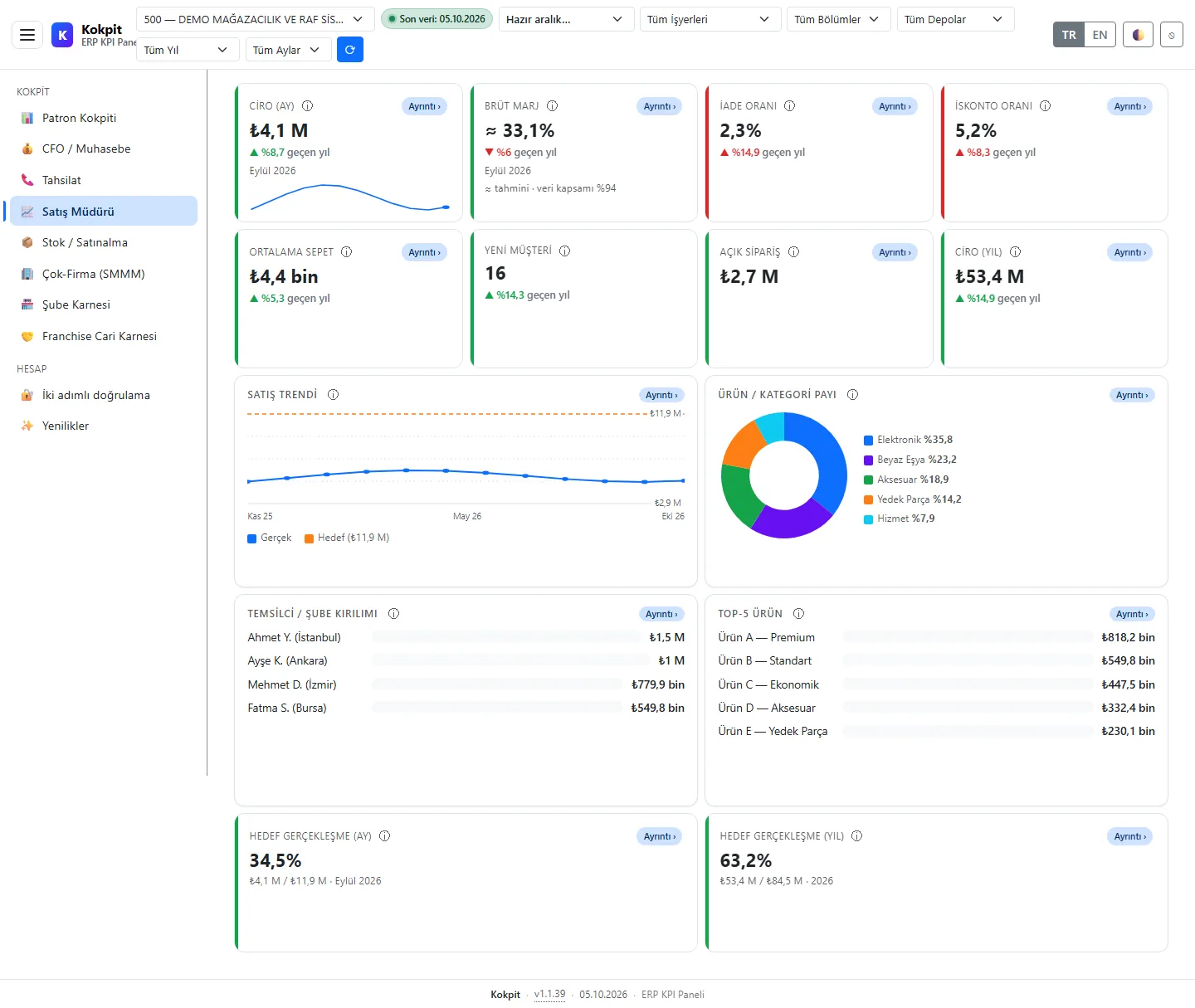
  • Sales direction set against the goal.
  • Share per category and a split by representative.
  • Returns, price cuts, typical basket size and first-time buyer indicators.

Inventory and buying

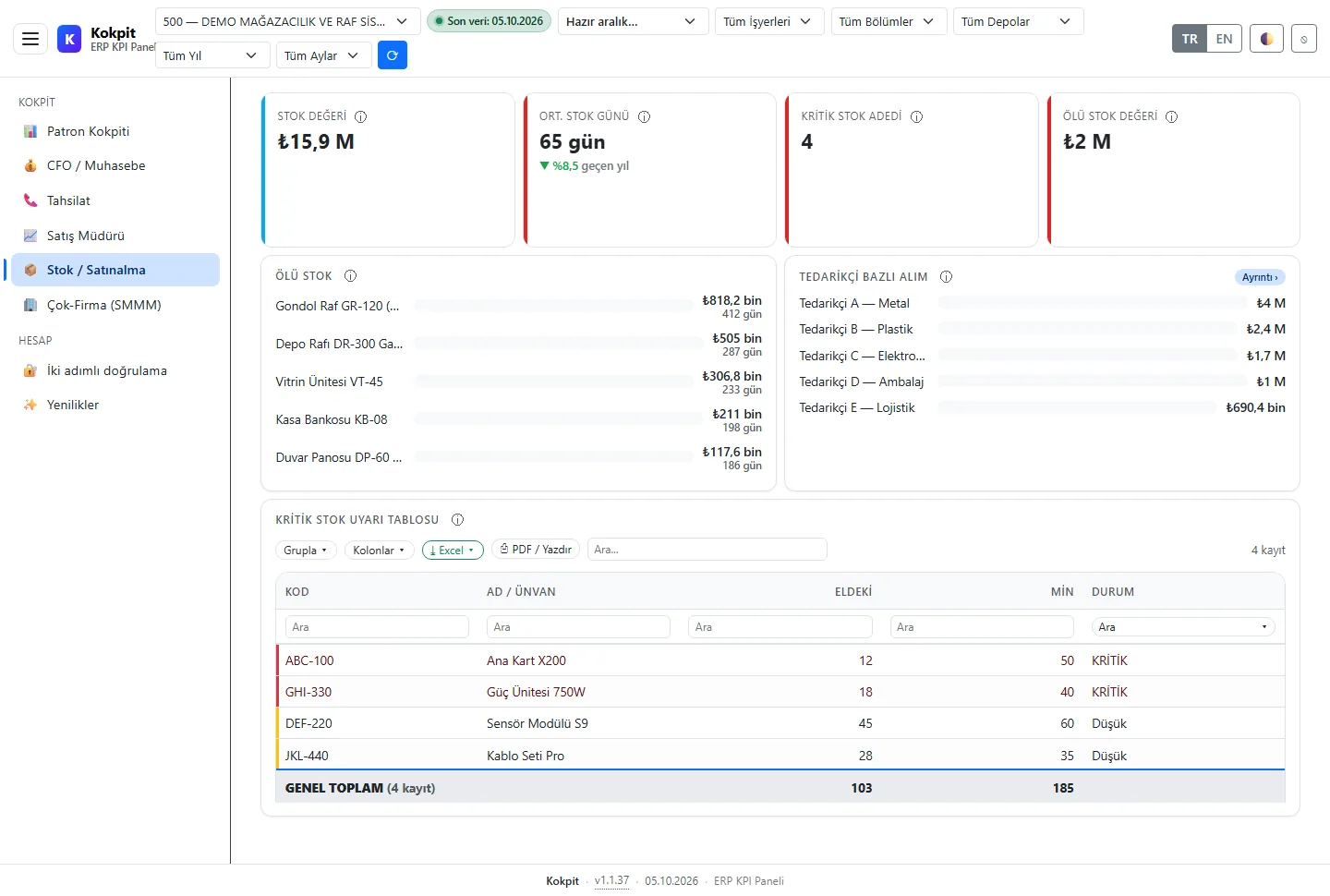
  • Inventory worth and turnover rate.
  • Low stock list: items close to running out.
  • Dead stock: lines that have stayed still for ages.
  • Buying split by supplier.

Accountant (many firms)

On the accountant's screen, client firms line up next to one another:

  • Every firm shows a risk score and a tiny direction line (sparkline).
  • Attention list: firms to check before the rest.
  • Firm-against-firm benchmarking.

Connection and safeguards

  • Records are taken from the Logo Tiger/GO company database through the ADR Bridge agent's read-only endpoint; queries follow fixed templates with parameters (SQL-injection safeguards pinned down by tests).
  • Logging in is mandatory; pages outside your rights show a 403 card, and login forms are guarded against cross-site request forgery.
  • Several tenants and firms are held apart within one installation.
  • A health endpoint (/healthz) to keep an eye on running state; interface in Turkish and English.

Trial environment

Behind the trial boards sits a real Logo Tiger demo company, holding no customer records. Complete the quote form and we will send you demo login details.

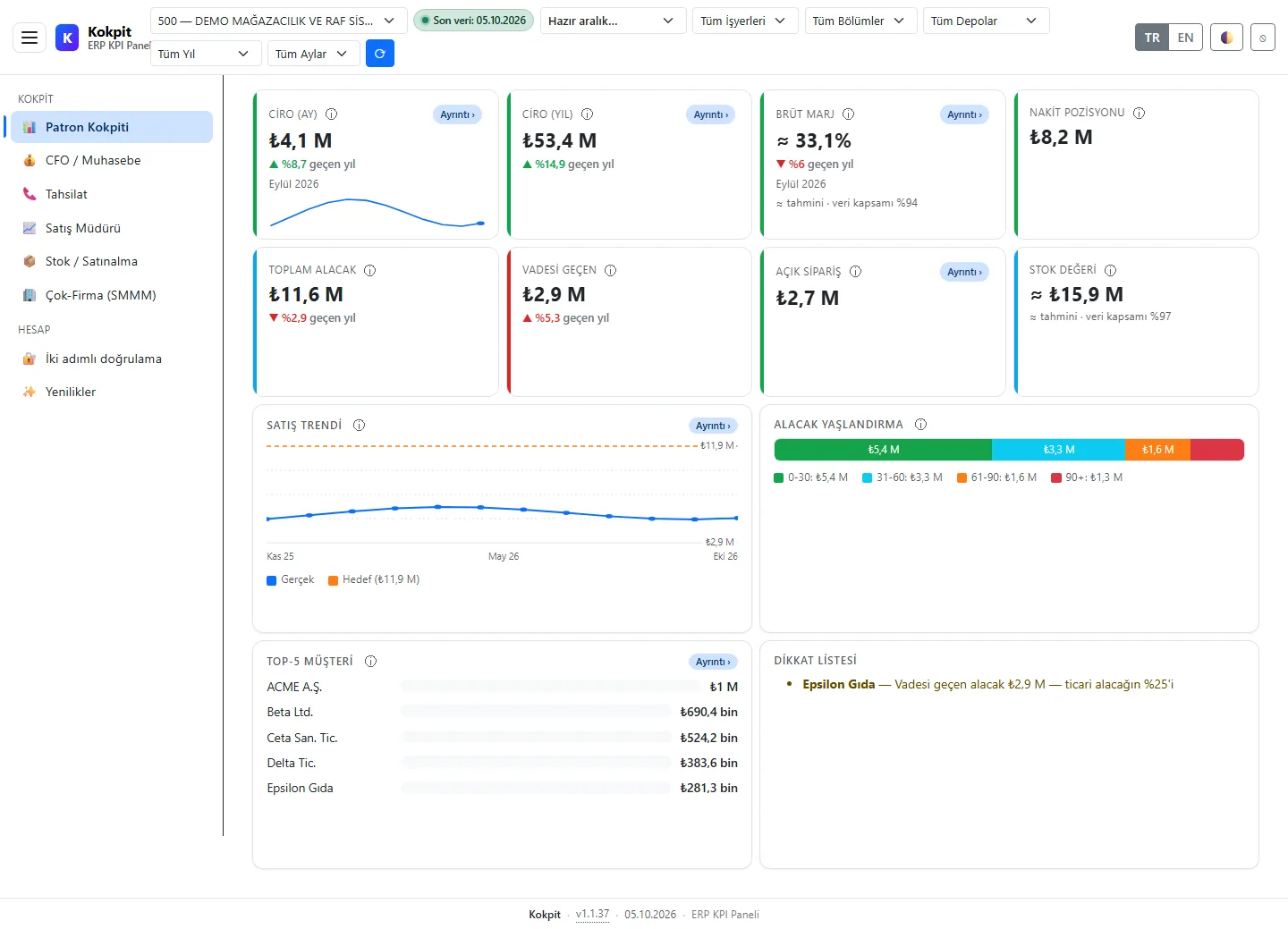
Screenshots

Owner board: cash, turnover, profit and warnings on one page (demo data)
Finance board: bank, cash, receivables and payables position (demo data)
Collections board: late receivables and customer exposure (demo data)
Sales board: turnover for the period split by customer and product (demo data)
Stock board: turnover rate, dwindling items and spread across warehouses (demo data)

Today vs. with LogoKokpit

Period-end reporting

Today (manual / spreadsheets)Printouts come out of Logo, get combined in Excel, and every chart is refreshed manually.

With LogoKokpitThe prepared board for your role appears; values are read live from Logo and are up to date each time.

Where a figure comes from

Today (manual / spreadsheets)Extra reports and voucher lists have to be opened to trace the origin of a total.

With LogoKokpitClick the value to go a level deeper; take it out as Excel or PDF.

Limits being passed

Today (manual / spreadsheets)Late receivables or dwindling inventory are seen only once somebody reviews the workbook.

With LogoKokpitA notification lands as soon as your limit is passed; no one needs to comb through workbooks.

How does pricing work?

Pricing depends on the modules you use and on the number of users and companies. Try it free first or ask for a short live demo; once the scope is clear, we send a written quote.

  • We are with you during installation and initial setup.
  • No credit card or payment details needed for the trial.
  • The quote states the scope, number of users and support period clearly.

Install in 3 steps

  1. 1. Prepare the link

    We put the ADR Bridge agent on your Logo server; the cockpit reads records via that agent, keeping your database closed to the outside.

  2. 2. Add your firms

    Type in your Logo company numbers and the default period; a single installation can track several firms.

  3. 3. Each team opens its own board

    People log in and land on the board prepared for their role: owner, CFO, sales, stock or accountant.

Frequently asked questions

What Logo products are supported?

Company databases of Logo Tiger and Logo GO.

Will it change anything in my Logo database?

No. The cockpit takes records from the ADR Bridge agent's read-only endpoint with fixed-template, parameterised queries.

Must my database face the internet?

No. The link goes via the ADR Bridge agent placed on your Logo server.

Can I track a number of firms?

Yes. One installation holds a number of firms, and the accountant's screen benchmarks client firms on risk score.

How do I get a trial?

Just complete the quote form and we will pass on trial login details backed by a Logo Tiger demo company.

Works well with

LOGO Power Bundle

A decision cockpit on your LOGO ERP data, no-code approval workflows and automatic Central Bank (TCMB) exchange rates.

All solution bundles

See it for yourself

Try the whole flow with a demo account on a fictional company's data; nothing is written to your real systems. Then we will prepare a quote for your needs.

Keep me informed

Choose how you would like to hear about LogoKokpit: news by email, or a call from us.

How would you like to be informed? (one or both)

Trial, demo or quote

What would you like?

Ideas and suggestions

Would you like a feature in LogoKokpit, have a suggestion or hit a problem? Tell us; the team reads every message and shapes the roadmap accordingly.

Type

Name and email are optional; leave an email if you would like us to get back to you.