Our Products Early access

Clean records in Logo — keyed manually or by robots

WizLog brings together wizards that create customer and stock cards to your business standard, robots working to a timetable and batch invoicing of waybills; each step is shown beforehand, dry-run and reversible.

Why WizLog — Data-Entry Wizards for Logo?

The problem

One faulty card corrupts each document that follows

  • A single customer ends up with two cards because the name was typed differently, so its balance and credit limit are divided.
  • Invisible characters copied from Excel along with tax numbers and company names break e-invoices and BA/BS filings.
  • Coding conventions, VAT and barcodes differ depending on who keys them; when the month closes, waybills are turned into invoices individually.
Our answer

Business rules applied as you save

  • A wizard that moves stage by stage: tax-ID check digits, an e-invoice registration lookup, code mask, EAN-13 barcode, the VAT rate in force.
  • Warnings about identical or look-alike cards catch mistakes before Logo ever sees them; when loading from Excel, each row is scrubbed under those same rules.
  • Robots build cards from Excel files left in a folder, review card quality at night and convert waybills to invoices when the month closes.

What sets us apart

Reversible automation that speaks Logo

  • Tight coupling with Logo: provinces and districts, tax offices, unit sets, sales representatives and payment plans come straight from Logo; entries are saved via Logo's native objects and confirmed afterwards.
  • Nothing is irreversible: preview, dry-run, an operations log and single-click reversal — whether for a card or an invoice.
  • Staff and robots obey one rulebook: a robot works with the wizard definition and write channel your users have; anything beyond a set threshold is routed to LogoSurec for sign-off.

Key features

Customer card wizard

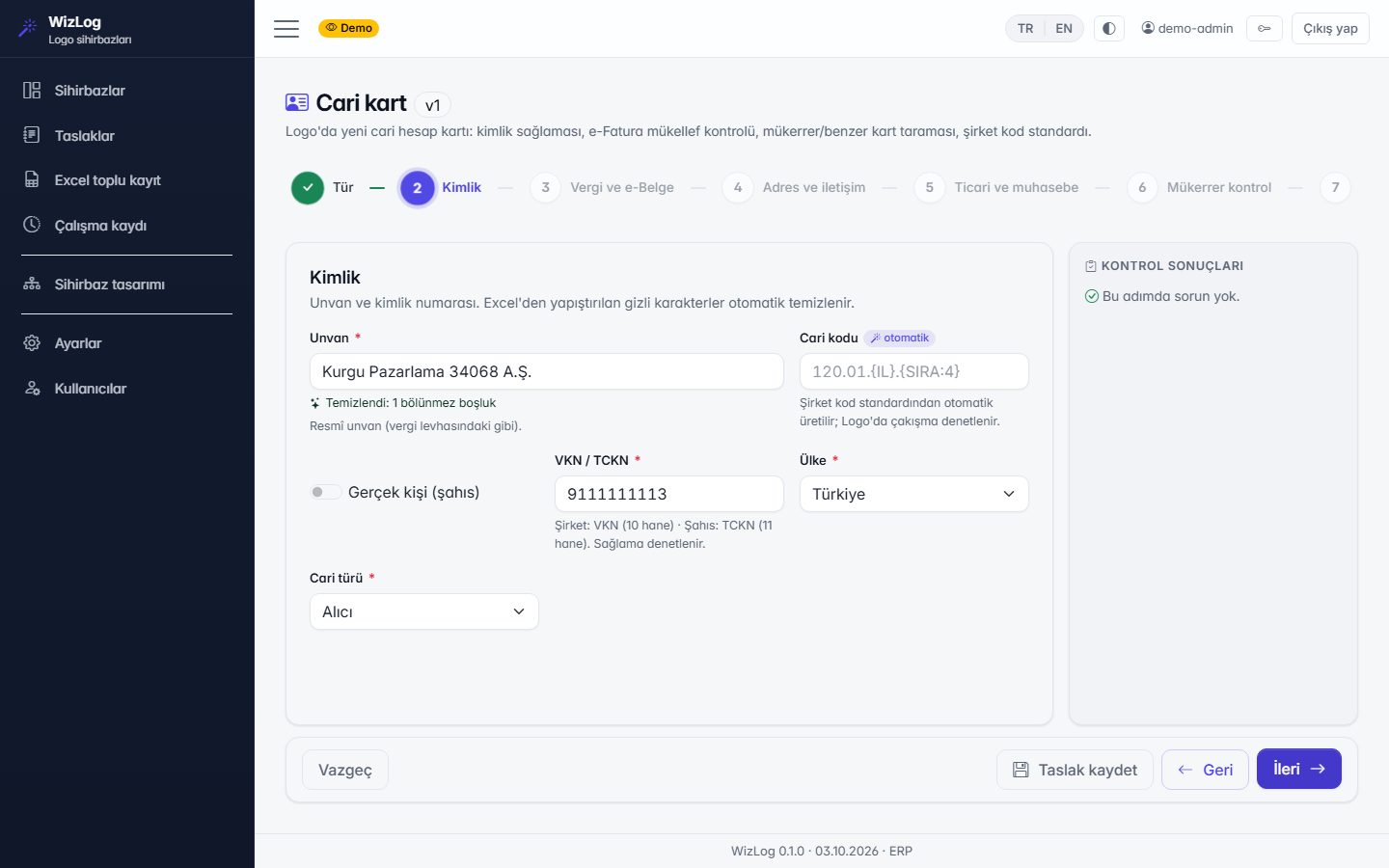
Ready templates for home, overseas, private-person and vendor accounts; tax-ID check digits, e-invoice registration lookup, overseas tax number, province and tax office pulled from Logo, sign-off for the credit limit.

Stock card wizard

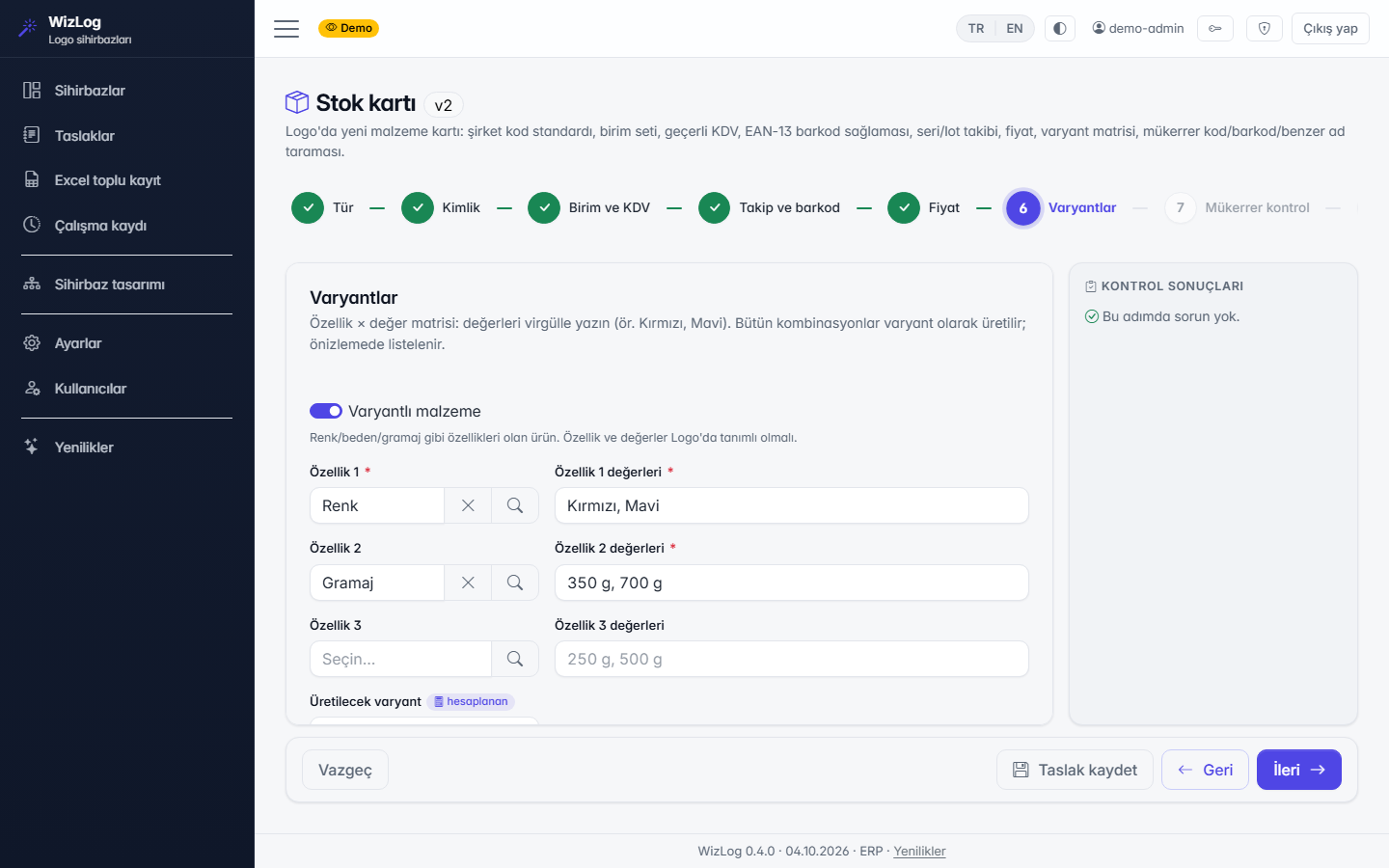
Trading goods, raw materials, semi-finished and finished products; unit sets, the VAT in force, serial/lot traceability, EAN-13 check digit and a variant matrix.

Loading from Excel

One definition for batch loading as well: invisible line breaks and non-breaking spaces are stripped, repeats inside the file are marked and problem rows come back to you in a separate Excel file.

No-code designer

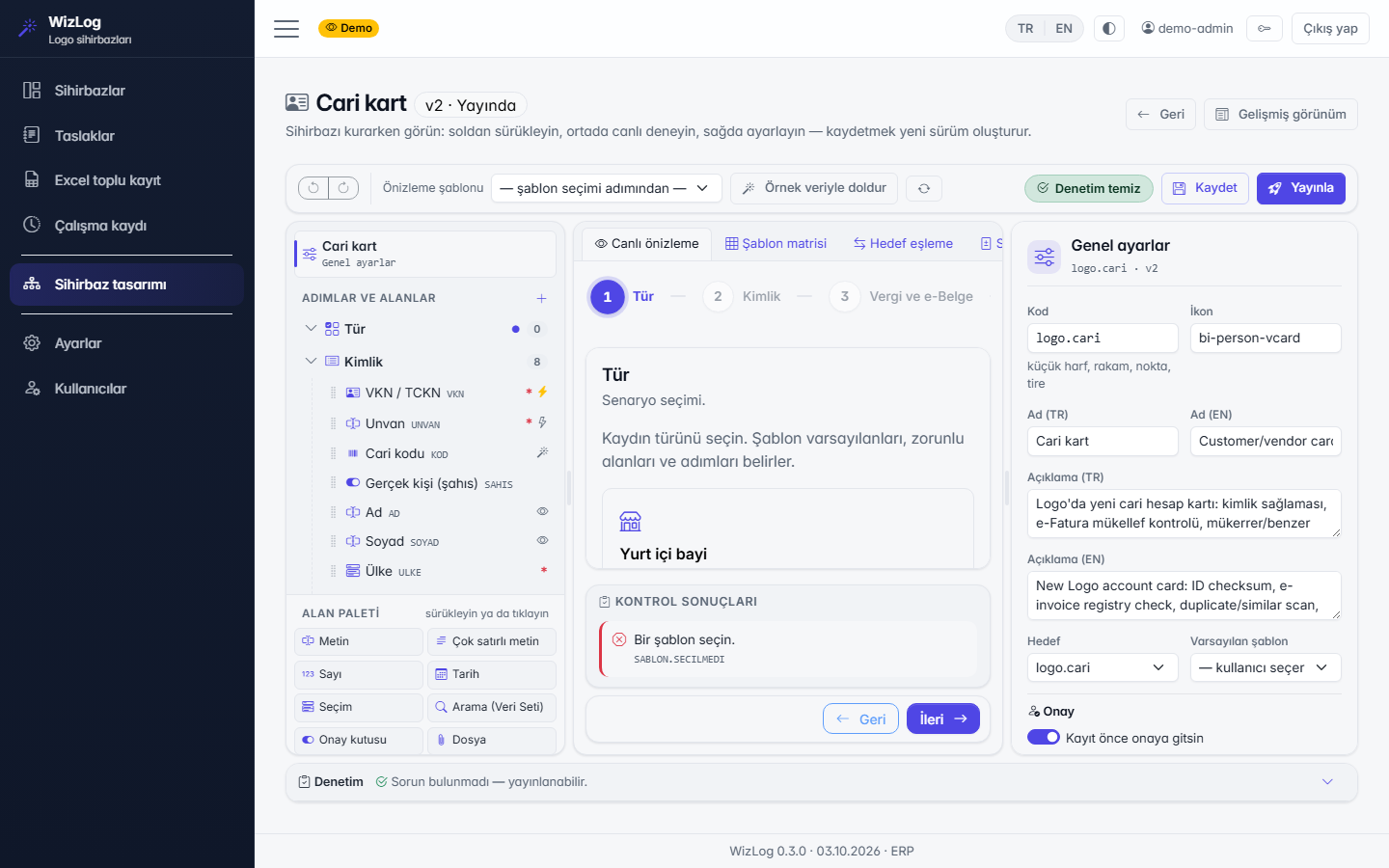
Edit stages, fields, templates, code masks and conditions with no programming; instant preview, version history and rollout as a .wizlog package.

Robots

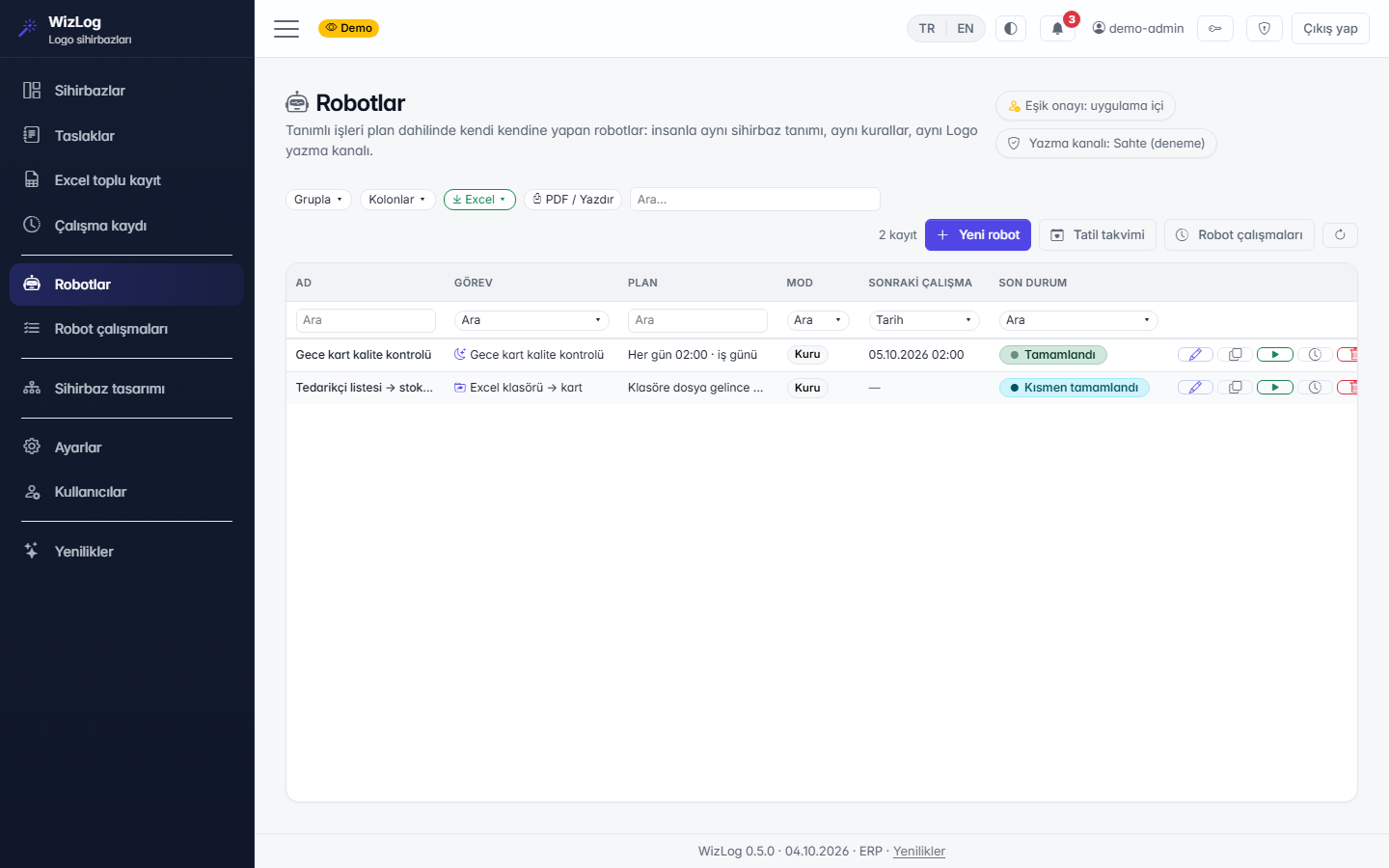
Card creation from an Excel folder, night-time card quality review, batch invoicing at month close; business-day and holiday calendar, dry-run, count and amount thresholds, LogoSurec sign-off.

Batch invoicing of waybills

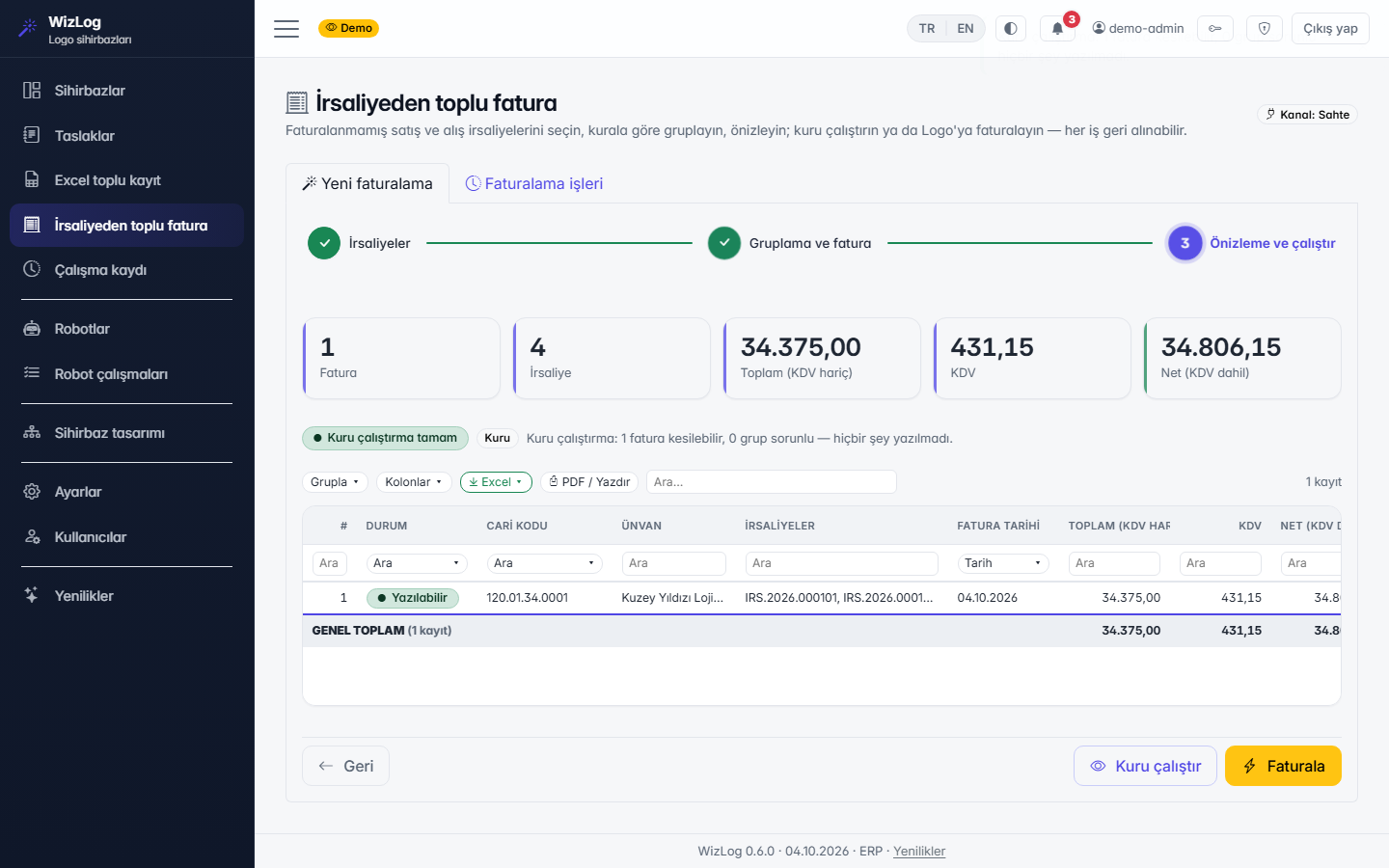
Sales and purchase waybills; grouping by waybill, account or month, a reminder about the seven-day statutory limit, protection against double billing, dry-run and reversal.

Product details

Intended usersAccounting and finance teams, sales and warehouse staff, ERP dealers
AccessBrowser interface (desktop and mobile browser); on-premises Windows service
Setup / usageSetup wizard, Logo connection
CompatibilityLogo Tiger (verified on the TIGER3 schema); GO being verified; SQL Server
Licence scopeIn beta: ready-made wizards and robots can be tried with the demo account; packages are shared during early access

Screenshots

Customer card wizard: the identity stage with its check outcomes
Stock card wizard: the variant matrix screen
Designer: structure tree, instant preview, property panel
Robots: timetable, dry-run and most recent state
Batch invoicing of waybills: preview and dry-run

Today vs. with WizLog — Data-Entry Wizards for Logo

Opening a customer account

Today (manual / spreadsheets)One customer gets saved twice under different names; mistakes in the tax ID or company name surface once e-invoices go out.

With WizLog — Data-Entry Wizards for LogoThe wizard verifies the tax ID and looks up e-invoice registration, flagging any look-alike account ahead of saving.

Many cards out of Excel

Today (manual / spreadsheets)Invisible characters and repeats in copied rows get scrubbed manually afterwards.

With WizLog — Data-Entry Wizards for LogoAll rows are scrubbed under identical rules, repeats inside the file are marked and problem rows return to you in Excel.

Turning dispatch notes into invoices

Today (manual / spreadsheets)When the month closes, dispatch notes are billed individually.

With WizLog — Data-Entry Wizards for LogoNotes are grouped per note, account or month and billed in a batch; a dry run comes first, reversal if required.

Packages and pricing

Trial

Free

  • All wizards, preview and dry run
  • No writing to Logo, no time limit

Cards

TRY 990 / month / company

  • Customer and item card wizards
  • Excel bulk entry, writing to Logo and undo

Documents

TRY 1,490 / month / company

  • Bulk invoicing from delivery notes (sales and purchase)
  • Seven-day rule warning, dry run, undo

Cards + Documents

TRY 1,990 / month / company

  • Both packages together
  • About 20% less than buying separately

WizLog Complete

TRY 2,990 / month / company

  • Cards + Documents
  • Month-end close and debt closing

Robots (add-on)

TRY 790 / month / company

  • First 3 robot jobs; each further job TRY 190 / month
  • Schedule, dry run, threshold approval

Prices exclude VAT. Paying annually in advance: 12 months for the price of 10. Early access: the first 3 founding customers get 50% off for 12 months. Ask for a quote for installation, training and enterprise terms.

Frequently asked questions

At what point are entries saved to Logo?
Out of the box the write channel is a sandbox that leaves Logo untouched. Live saving is switched on solely for companies you permit; each entry is reviewed in preview first, confirmed once saved and reversible from the operations log.
Are robots left to act without oversight?
They are not. Out of the box robots perform dry runs and are bound by count and amount caps; anything over the cap is routed for sign-off. Each robot saves under the permissions of a Logo user you pick, and all of its runs are reversible.
Can we define a card standard specific to our business?
You can. The designer lets you edit stages, fields, templates, code masks and conditions with no programming; that one definition serves individual entry, Excel batch loading and robots alike.
How is it priced?
Package scope follows which wizard, robot and document modules you take. Throughout early access we tailor a quote to your requirements; use the form at the foot of this page to get in touch.

See it for yourself

Try the whole flow with a demo account on a fictional company's data; nothing is written to your real systems. Then we will prepare a quote for your needs.

Keep me informed

WizLog — Data-Entry Wizards for Logo is not released yet. Shall we email you when it launches, or give you a call? Choose your channel.

How would you like to be informed? (one or both)

Apply for early access

The product is in pilot. Apply and we will share the early-access terms and pricing with you directly.

Ideas and suggestions

Would you like a feature in WizLog — Data-Entry Wizards for Logo, have a suggestion or hit a problem? Tell us; the team reads every message and shapes the roadmap accordingly.

Type

Name and email are optional; leave an email if you would like us to get back to you.