Our Products

Onay ve iş akışlarınızı kod yazmadan kurun

Talep, onay zinciri, görev ve form; kimde beklediği, ne kadar sürdüğü ve ERP'ye ne yazdığı görünür.

Why LogoSüreç?

The problem

Where do sign-offs stall?

  • Requests bounce between inboxes and phone calls; no one can tell whose desk they sit on.
  • Each person applies their own sign-off logic, and nothing is logged.
  • Once cleared, the work is typed into the ERP a second time.

Our answer

How LogoSüreç helps

  • Lay out the flow by dragging blocks onto a canvas, defining steps, rules, forms and time limits.
  • Whoever holds the current step, and for how long, stays on screen; late items prompt a nudge.
  • Cleared items reach Logo over the ERP link.

What sets us apart

What sets it apart

  • 17 bundled templates let you go live from the first day.
  • Each step and ruling is kept in an audit log.
  • No coding involved; flow owners edit them on their own.

Key features

No-code tasarım

Formları, adımları, kararları ve onay akışlarını görsel olarak kurun.

İşin sahibi ve zamanı

Görev, sorumlu, SLA ve bildirimlerle hiçbir iş sahipsiz kalmasın.

İzlenebilir sonuç

Darboğazları, tamamlanma sürelerini ve iş geçmişini görünür kılın.

Sign off and get alerts on mobile

Approvers receive alerts and decide from their phones; overdue items prompt a nudge and move up the chain.

17 bundled processes

Purchasing, leave, recruitment, travel and advances, expenses, IT help, contract sign-off and others are included at setup.

Invoice and order forms

Invoice and order layouts split into header, line and footer areas; per-line formulas, sums and PDF printouts.

ERP connectivity

Invoke REST/SOAP services from any step and post mapped records to Logo Tiger and Mega.

Reporting

Request listing, per-status summary, Excel output and print-ready reports carrying your letterhead.

Product details

Intended usersPurchasing, finance, human resources and operations teams
AccessInstalled on your server or hosted
Setup / usageInstallation and transfer of ready-made processes by our team
CompatibilityIntegrated with LOGO ERP; also works without an ERP
Licence scopeBased on the number of users

Product documentation

Overview

Plan, operate and follow requests and sign-offs through a no-code flow builder, SLA timers, alerts, forms and ERP connectors.

Form editor

Collect data without coding

  • Visual layout: pull a field off the palette, drop it on the form, then reposition and resize it.
  • Field kinds: text, numeric, date, pick list, attachment and ERP lookup — suggestions as you type plus a browse window.
  • Formulas and checks; lengthy forms are broken into tabs.
  • Document form: header / detail / footer roles, per-line formulas and SUM() footer totals; Invoice or Order template in a single click.
  • Labels are entered in Turkish and English and appear in each person's own language.

Flow editor and step kinds

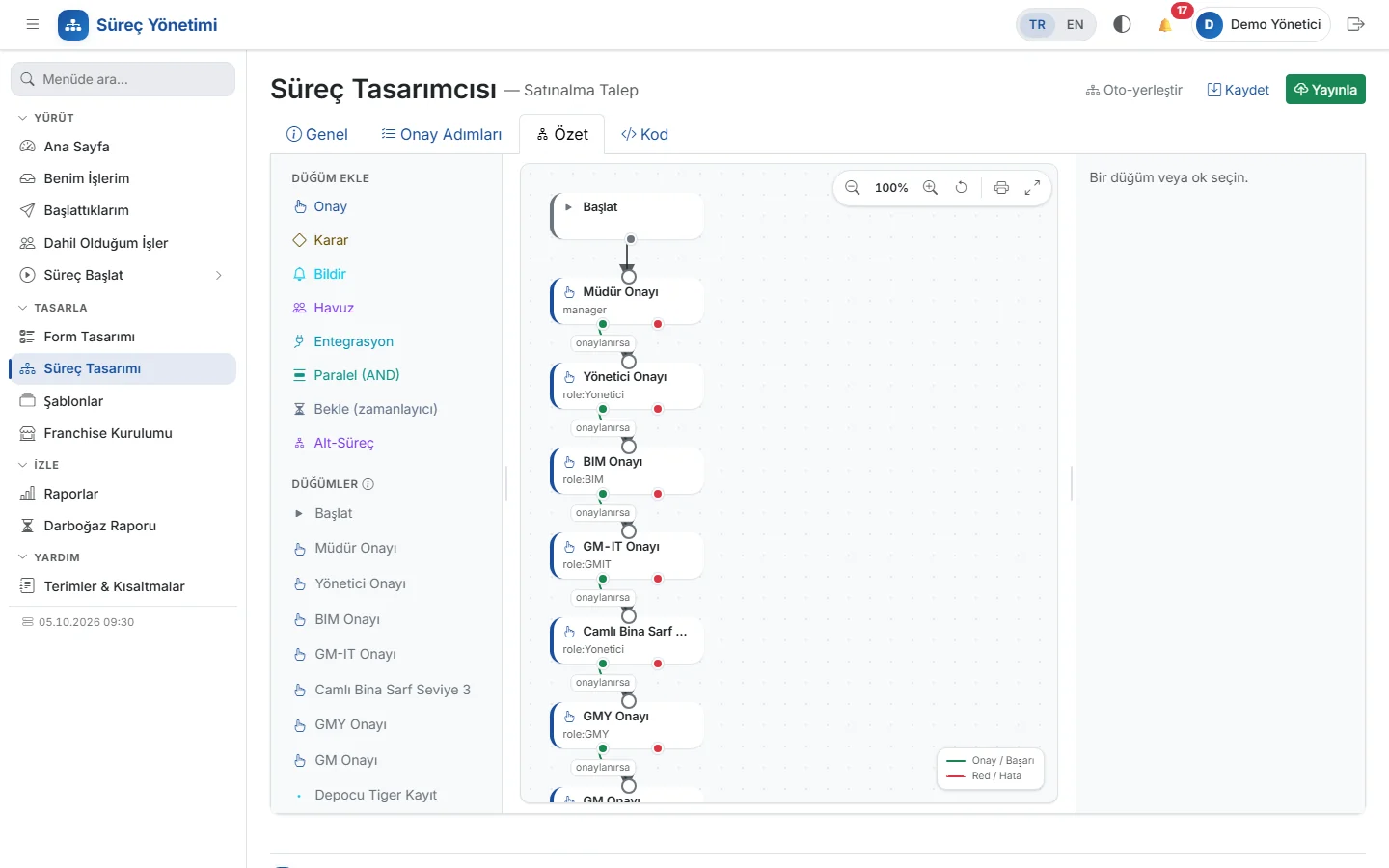
You assemble the flow on a visual canvas: each step is a card, linked to the next by dragging from its approve (green) or reject (red) handle; an auto-layout button tidies everything up. The Code tab exposes that same definition in JSON.

StepPurpose
ApprovalLands with a person, a role or the line manager; forks according to rules
PoolA role receives the item and one member claims it
ParallelBranches proceed simultaneously and merge once every one is done
WaitPauses for a set time or until a date held in the form, then resumes by itself
Sub-processTriggers a separate flow and carries on according to its result
IntegrationPosts to the ERP or calls a service; if it fails, control passes to an error step
NotificationSends bell and e-mail alerts to the people concerned

Flows live in Development, Test and Live modes; definitions can be duplicated and exported in JSON.

Bundled processes

17 flows included at setup

TopicFlows
PurchasingPurchase Request (Manager → Director → Deputy GM → GM approval chain, amount thresholds), Shared Purchasing Pool, Warehouse → Pool Assignment, Request → Order
People (HR)Annual Leave, Hiring and Onboarding, Probation Period, Offboarding
Accounting and financeBusiness Travel and Advance, Expense Claim (with attachments), e-Invoice, Contract Approval
IT and administrationIT Support, IT Support and Change, Vehicle Rental, Meeting

Run any of them unchanged, or duplicate one and tailor it to how your organisation works; our team can help with the tailoring.

For staff

  • Start a process: choose a published flow and complete its form.
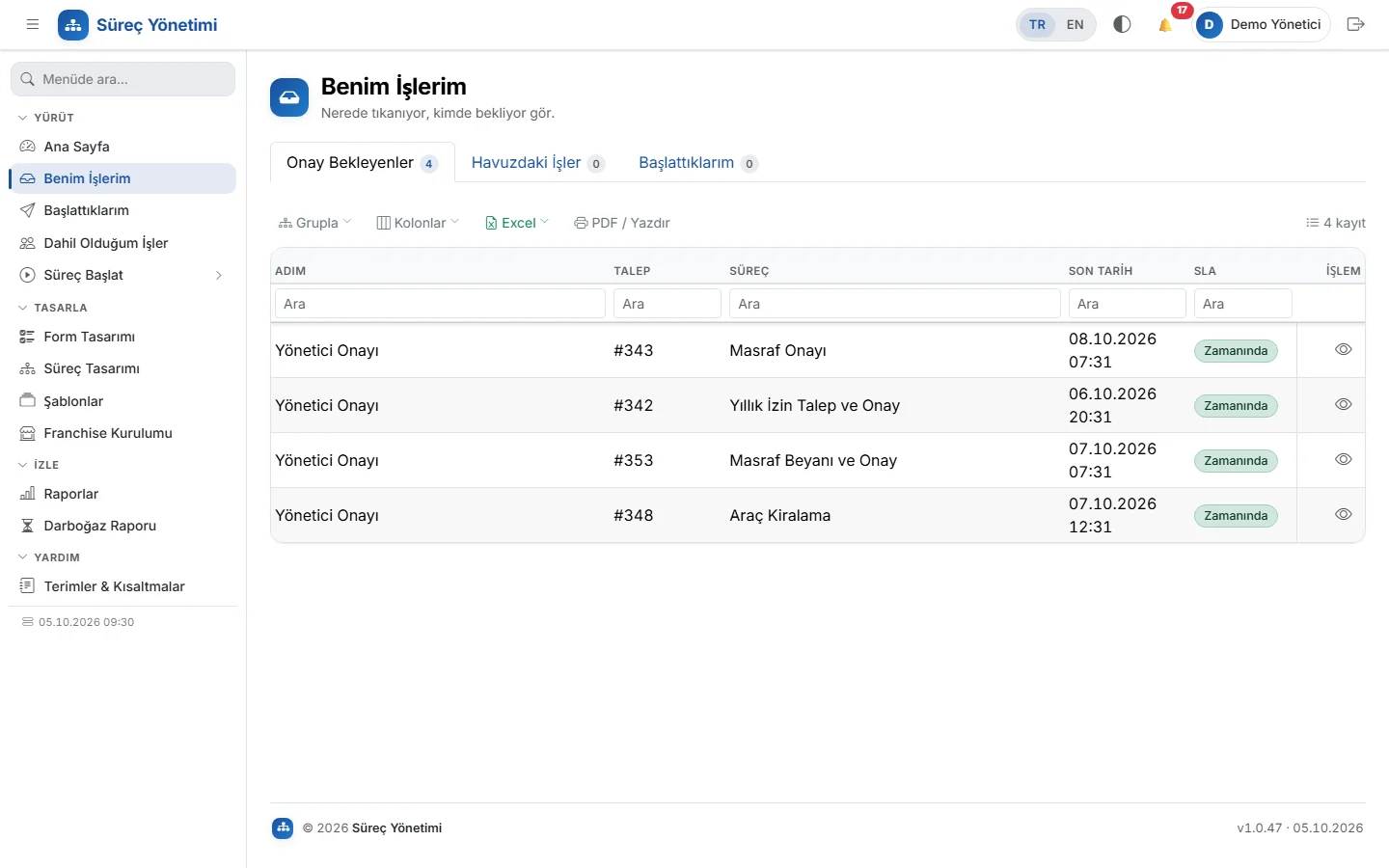
  • My Tasks and Tasks I'm involved in: sign-offs awaiting you and requests you are part of.
  • Pool tasks: list items sent to your role and claim one.
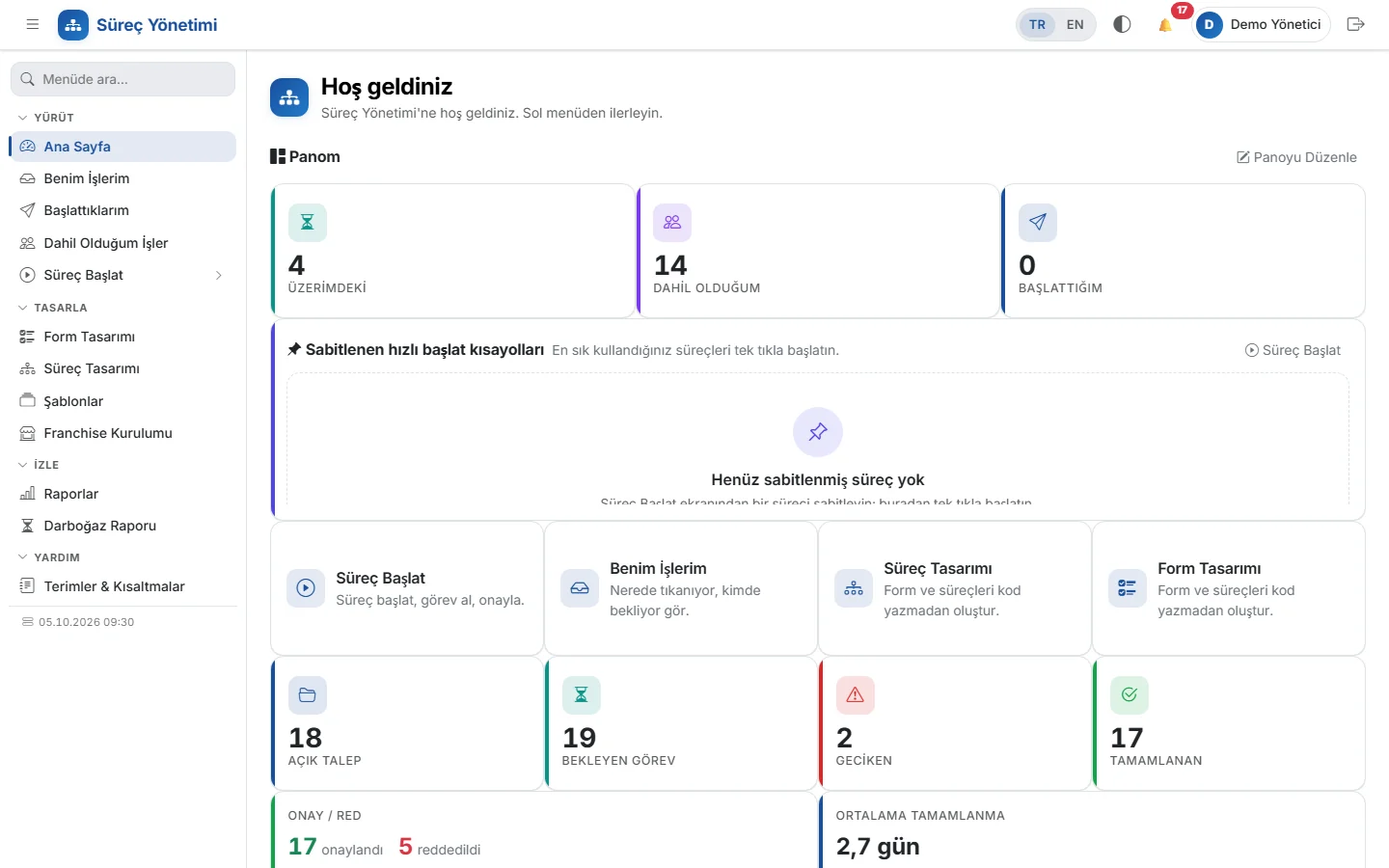
  • Personal dashboard: cards you can drag around and resize, stored for each user.
  • Recurring tasks appear by themselves on schedule; delegation hands your items to a colleague during absences.

SLA timers and alerts

  • Each step carries a deadline; a coloured SLA badge flags lateness and expired steps escalate to the line manager.
  • Alerts reach the bell in the top bar and the inbox; mail is sent via the ADR Posta relay, and the app never keeps a mailbox password.
  • Each transition goes into an append-only event log: who acted, at what moment and with which ruling.

Connections and data

  • Connections: outside databases are set up through a structured builder, tested, then kept encrypted.
  • Data sets: saved, named SQL queries powering lookups and reports.
  • Connectors: REST, SOAP and code (C#/VB); a mapping wizard posts records to Logo Tiger (through the Bridge layer) and Mega (MegApi).
  • Calls leaving the server are guarded against server-side request forgery (SSRF).

Reports and output

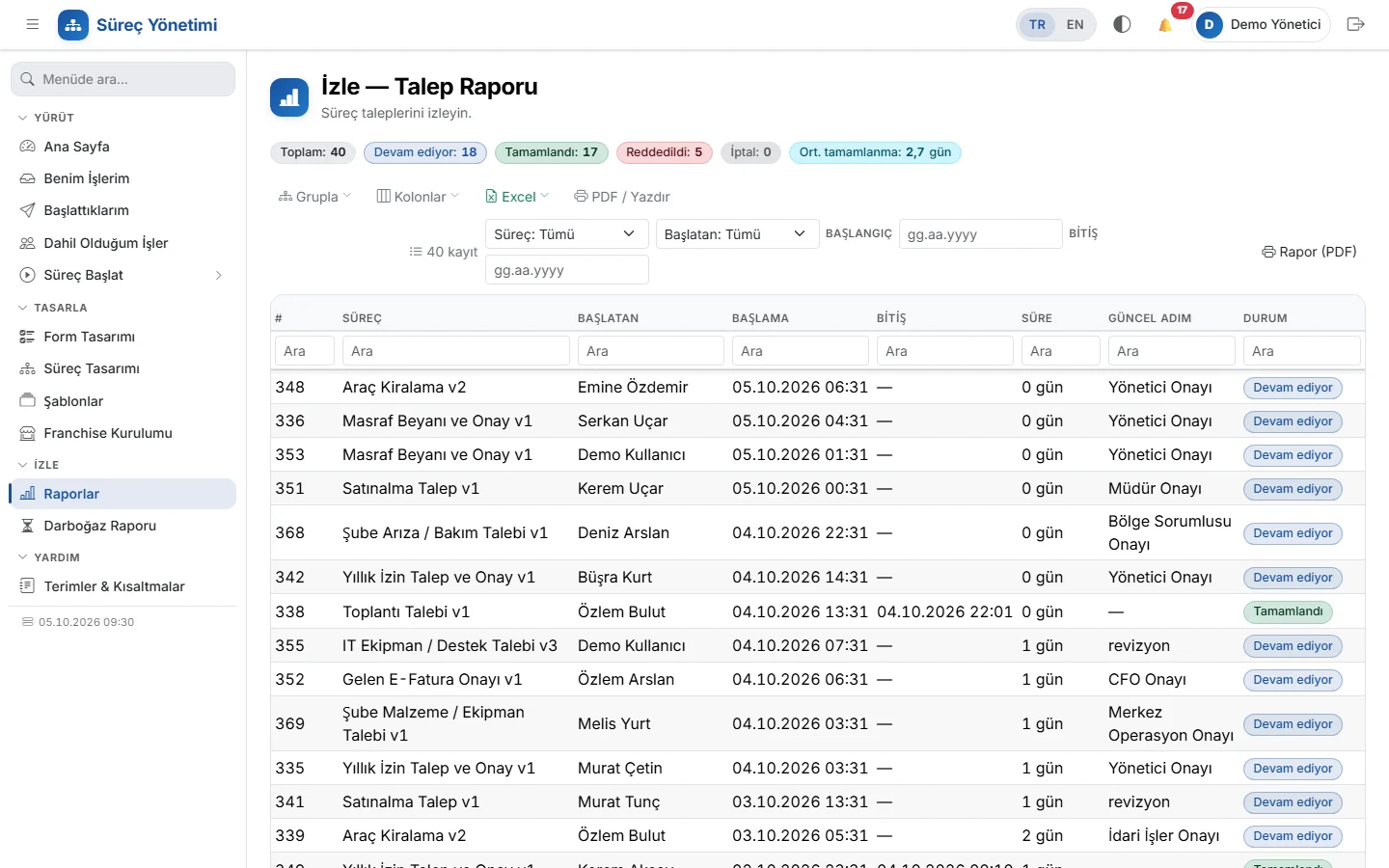
  • Request report: narrow down by flow, status, date or the person who started it.
  • Summary: per-status counts and mean time to finish, honouring the active filter.
  • Any list goes out to Excel (with genuine numeric types) or CSV, or straight to the printer.
  • Document output: invoice/order forms turn into a PDF with header, line table, footer and signature box.
  • Banded report: print-ready with letterhead, filters, summary, details and footer.

Admin tools and security

  • Users, roles and the reporting hierarchy; mass upload via CSV/JSON.
  • Admins may sign in as anyone to try a flow from that colleague's perspective.
  • New users must reset their password on first login; repeated wrong attempts lock the account, and files download only after an ownership check.
  • Interface in Turkish and English; health endpoints (/healthz, /readyz) for monitoring.
  • A framework for carrying data over from e-Flow and Logo Flow is ready.

Screenshots

Dashboard: open items, approvals in queue and overdue steps
Flow editor: drag-and-drop steps, rules and sign-off order
My work: sign-offs and tasks assigned to you
Request listing: status, assignee and elapsed time
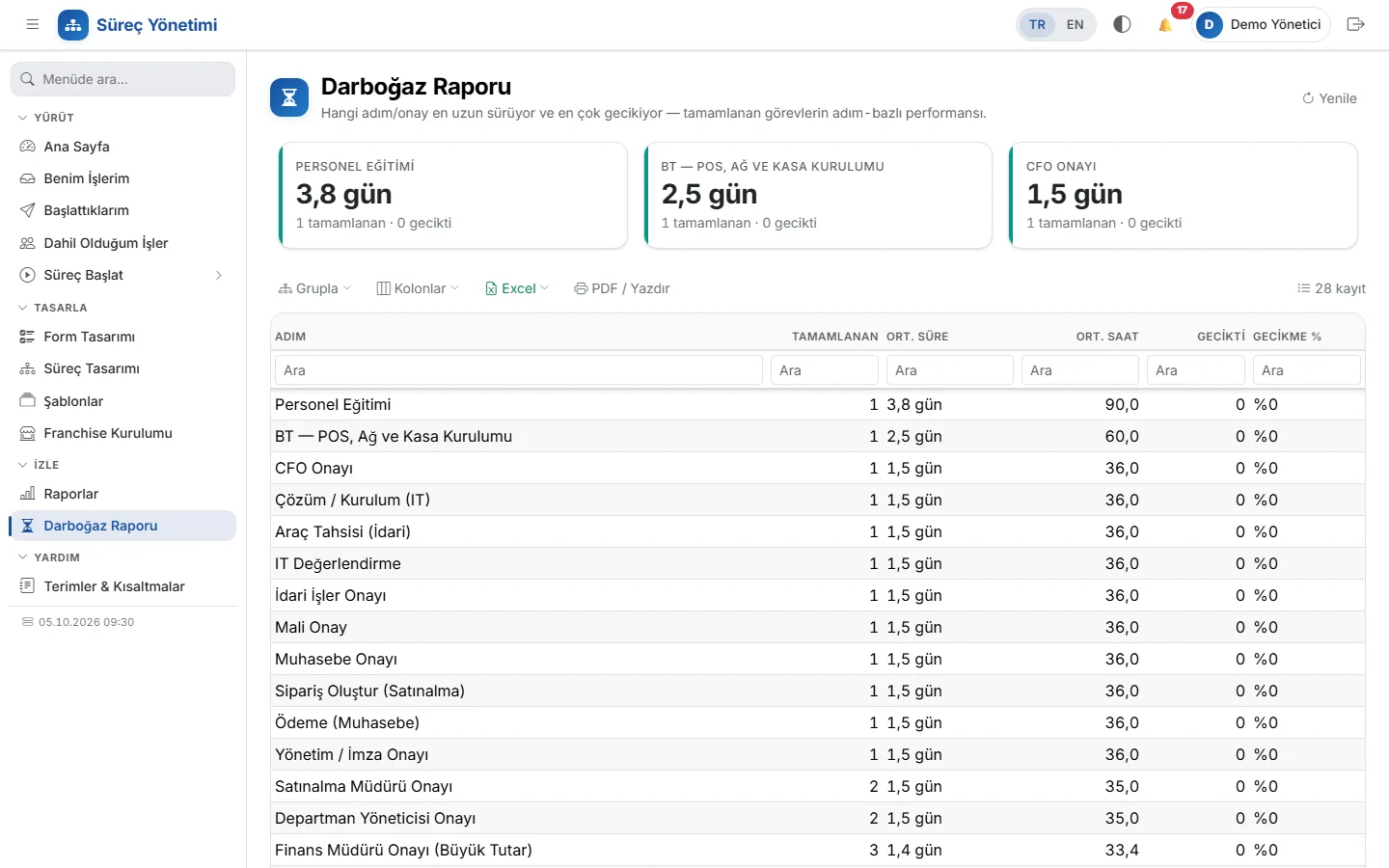
Bottleneck view: steps that hold work longest

Today vs. with LogoSüreç

Sign-off chain

Today (manual / spreadsheets)Requests leave by e-mail, then everyone waits and phones around to find out whose desk holds them.

With LogoSüreçChains are built without code; approvers decide on their phones, and late steps trigger a nudge before moving up the chain.

Getting it into Logo

Today (manual / spreadsheets)Once cleared, the request is retyped into Logo, so typing mistakes remain possible.

With LogoSüreçCleared records land in Logo Tiger / Mega via mapped fields.

Who signed off, and at what time?

Today (manual / spreadsheets)People dig through mail chains and notes kept on files.

With LogoSüreçEach step is captured in the audit log; reporting reveals timings and steps still open.

How does pricing work?

Pricing depends on the modules you use and on the number of users and companies. Try it free first or ask for a short live demo; once the scope is clear, we send a written quote.

  • We are with you during installation and initial setup.
  • No credit card or payment details needed for the trial.
  • The quote states the scope, number of users and support period clearly.

Install in 3 steps

  1. 1. Model

    Lay out the form in the drag-and-drop editor and the flow on the canvas, or duplicate a bundled template to start.

  2. 2. Operate

    Staff kick off a flow; items reach each approver in sequence and people carry on from «My Tasks».

  3. 3. Track

    Follow where each request sits, how its SLA stands and how long items took, using dashboards and reports.

Frequently asked questions

Is coding knowledge required to build a flow?

Not at all. Forms take shape in a drag-and-drop editor and flows on a canvas. Anyone who wants to can also edit that definition in JSON through the Code tab.

Could we begin from bundled templates?

Certainly. 17 flows ship with the setup, among them purchasing, leave, recruitment, travel and advances, expenses, IT help and contract sign-off; duplicate and tailor them.

Does it post records into Logo ERP?

It does. The integration step uses a mapping wizard to post into Logo Tiger (through the Bridge layer) and Mega; when something fails, the flow switches to an error step rather than carrying on quietly.

Is switching from e-Flow or Logo Flow possible?

The purchasing flow pack was built on Logo Flow definitions, and a framework for carrying over e-Flow/Logo Flow data is ready. We settle the migration scope with you while preparing the quote.

Where can I see who is holding a request?

The Monitor screen lists the step and the person each request sits with, along with its SLA badge and event log; steps past their deadline escalate to the line manager.

Works well with

LOGO Power Bundle

A decision cockpit on your LOGO ERP data, no-code approval workflows and automatic Central Bank (TCMB) exchange rates.

All solution bundles

See it for yourself

Try the whole flow with a demo account on a fictional company's data; nothing is written to your real systems. Then we will prepare a quote for your needs.

Keep me informed

Choose how you would like to hear about LogoSüreç: news by email, or a call from us.

How would you like to be informed? (one or both)

Trial, demo or quote

What would you like?

Ideas and suggestions

Would you like a feature in LogoSüreç, have a suggestion or hit a problem? Tell us; the team reads every message and shapes the roadmap accordingly.

Type

Name and email are optional; leave an email if you would like us to get back to you.