Our Products Early access

A monthly background check-up for your Logo records

Catches conflicting entries before the period closes and follows up on whether each one was resolved. Nothing in Logo is altered, and information remains on your premises.

Why Pre-Close Data Check?

The problem

What slips through at period end?

  • Reversed balances, accounts that don't tie up or vouchers left open usually surface on the day returns are filed.
  • What to look at is kept in one employee's memory, so identical errors come back month after month.
  • No one follows up on whether a detected problem was put right.

Our answer

What does the agent take on?

  • Each month it pulls your Logo data on the server and applies the 40 accounting rules one by one.
  • It ranks what it finds by priority, with the relevant voucher and account alongside each item.
  • It produces a health score month by month and keeps resolved items apart from newly appearing ones.

What sets us apart

Why it stands apart

  • Strictly reading; it alters not a single Logo record.
  • Nothing leaves your server; the report is put together in-house.
  • Your accountant and finance staff discuss the same document.

Free Quick Scan

We scan the last completed month of one of your Logo companies with 40 checks, free of charge, and review the result together.

Key features

40 accounting rules

Customer-ledger agreement, VAT, stock and costing, cash and bank, year-end and record integrity — scored under nine headings.

A health score each month

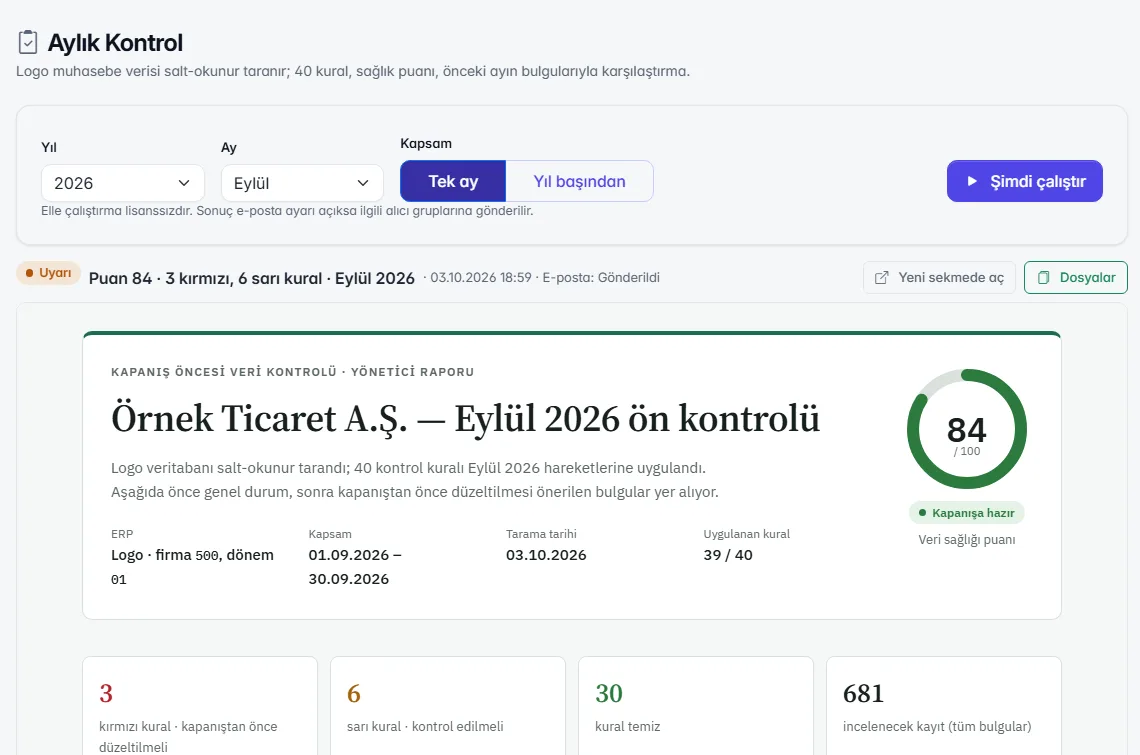
Scanning with an unchanging rule set, a score from 0 to 100, red/amber flags and an Excel file with the particulars.

Follow-up report

Whether last month's red items were cleared, remain open or are fresh — on a single page.

Reads only, runs in-house

The Logo link has no write rights; scans and the archive sit on your server, and the only thing sent out is your own e-mail report.

Product details

Intended usersFinance manager, accounting team, financial advisor
AccessOn-premises Windows service + browser interface
Setup / usageSingle installer, 6-step wizard
CompatibilityLogo Tiger (Tiger 3 / GO being verified), SQL Server
Licence scopeManual scans are free; scheduling, e-mail reports and e-Ledger monitoring are licensed

Product documentation

Overview

An agent installed on your server looks at your Logo records without touching anything, and every month it reviews the same set of rules across receivables and payables, stock, VAT, cash and bank, year-end and record integrity. What comes out — a health score between 0 and 100, items flagged red or amber, and a comparison with the previous month — is mailed to your finance department and your accountant.

Which Logo products it works with (last confirmed 04.10.2026)
ProductStatus
Logo Tiger 3 / Tiger Enterprise (SQL Server)Tried and confirmed
Logo Tiger 2Awaiting confirmation in the pilot — where a field is absent the rule returns «not applicable» and scanning carries on
Logo GO 3 / GO WingsAwaiting confirmation in the pilot — data schema from the same family
Logo j-Platform, Netsis, MikroOutside scope

How it runs

  1. Setup. One installer places the agent on your server as a Windows service, after which a 6-step wizard in the browser walks through the agent database, administrator account, Logo connection with company/period choice, e-Ledger folder, e-mail and licence.
  2. Scanning. Monthly on its own, or whenever you ask, it looks at your Logo data in read-only mode.
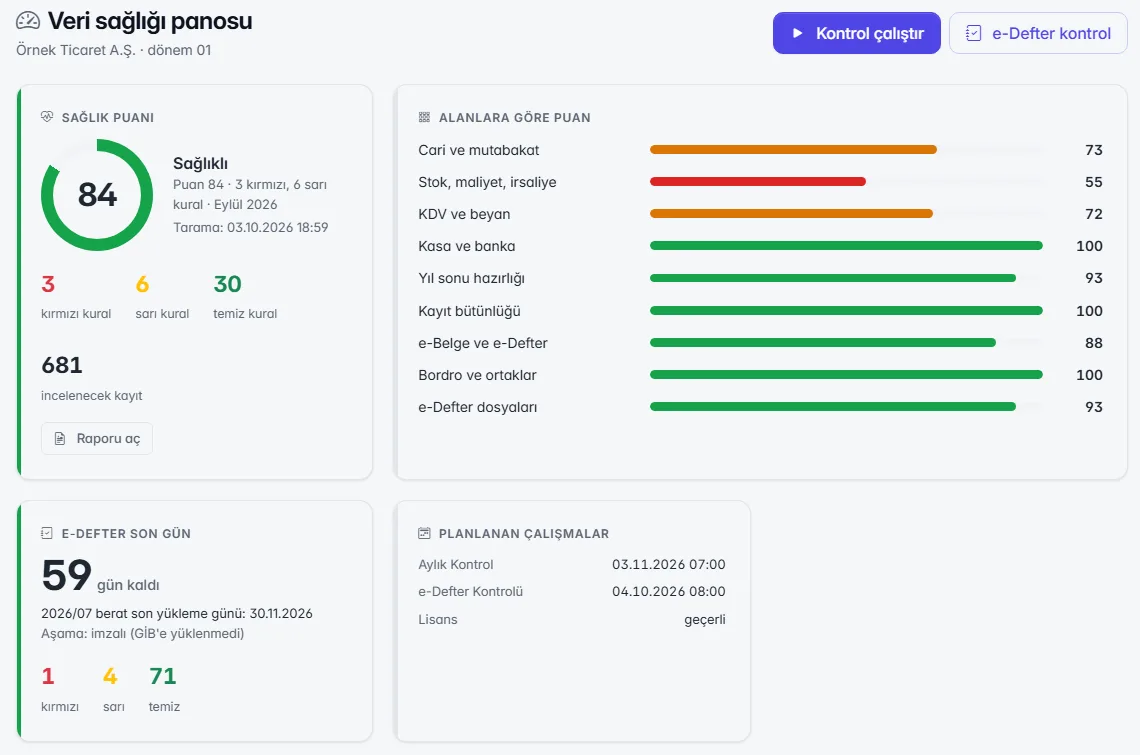
  3. Scoring. The dashboard presents a 0–100 health score, a breakdown under nine headings and how resolved items develop over time.
  4. Reporting. An HTML summary for management plus a detailed Excel list of items reach your finance department and accountant.

Data security and privacy

  • Logo is accessed with read permission only; each query executes in a transaction that is always reverted at the end.
  • Scan output and the archive sit on your server; the only items going out are the report dispatched via your own mail server and the licence verification.
  • Passwords and connection settings are held in encrypted form on the server, and the agent manages its own users and roles.

Where the idea came from

Putting accounting records through a periodic “health scan” traces back to a method our founder worked out roughly 27 years ago while employed at Logo: spot conflicts between entries on a fixed timetable, before a problem grows. This product rebuilds that method around current data volumes and e-Ledger requirements.

Professional limits

This software tests data quality and how consistently records agree with one another; it does not replace an accountant's opinion, tax advice or an audit report. Items it raises are “suggested for review”, and what gets corrected is for your accounting staff and accountant to decide. Logo is a trademark of its owner; this product has no affiliation with Logo and carries no endorsement from it.

Screenshots

Dashboard view: health score, scores per heading and a countdown to the e-Ledger deadline (fictional demo data)
Monthly check screen: management summary and counts of items raised (fictional demo data)
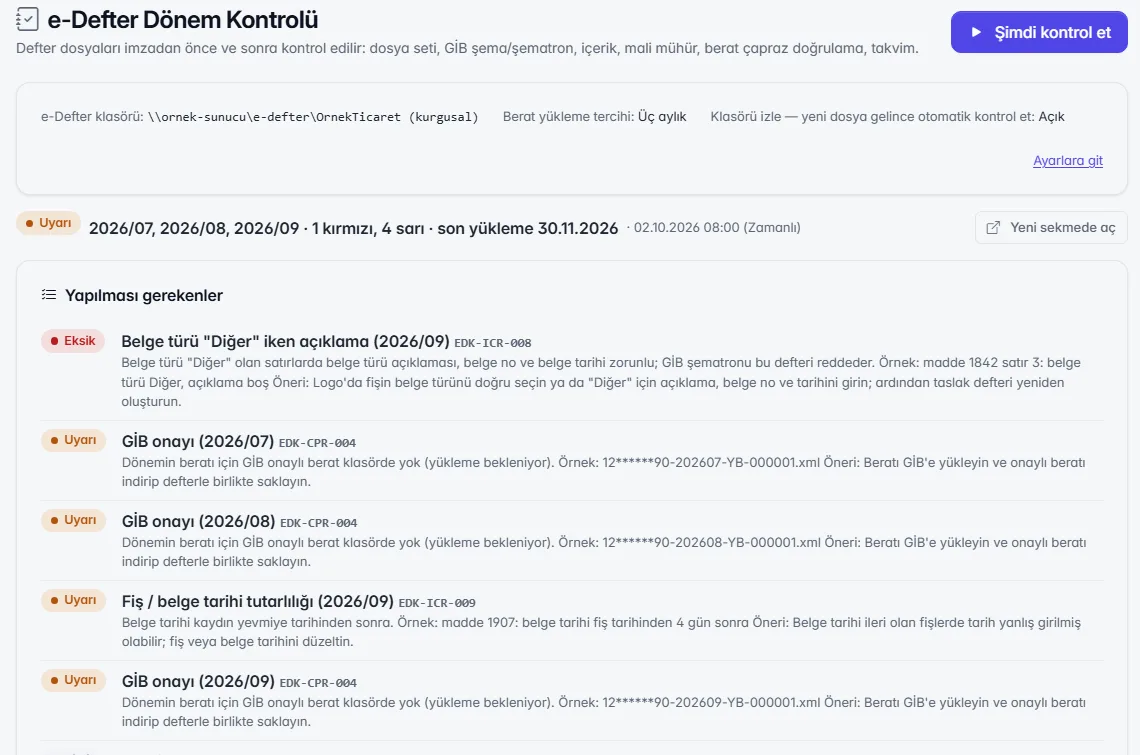
e-Ledger period check: to-do list (fictional demo data)

Today vs. with Pre-Close Data Check

Month-end review

Today (manual / spreadsheets)What to look at is entrusted to one person's memory; identical errors come back each month.

With Pre-Close Data CheckUnchanging rules are applied under nine headings every month, producing a health score and a priority-ranked list of items.

Noticing errors

Today (manual / spreadsheets)A reversed balance or an account that doesn't tie up surfaces only when returns are due.

With Pre-Close Data CheckEach item reaches you, together with its voucher and account, before the period closes.

Was it resolved?

Today (manual / spreadsheets)No one checks whether a detected problem was ever dealt with.

With Pre-Close Data CheckThe follow-up report makes plain which of last month's items were cleared, which persist and which are fresh.

Packages and pricing

Quick Scan

Free

  • One Logo company, most recent closed month
  • 40 rules, scan started by hand, results displayed on screen

Monthly Check

TRY 1,990 / month / company

  • Scan and health score produced on their own each month
  • HTML + Excel report by e-mail, plus the follow-up report

Checkup Complete

TRY 2,990 / month / company

  • Monthly Check + e-Ledger Period Check
  • Change Log, Access Review, Technical Health

Enterprise / Group

TRY 2,090 / month / company

  • 4 or more companies; Checkup Complete, per company
  • Group summary and priority support

Year-End Pre-Check (service)

TRY 14,900

  • Every month + year-end rules
  • Management report, Excel and a review meeting

Prices exclude VAT. Paying annually in advance: 12 months for the price of 10. Early access: the first 3 founding customers get 50% off for 12 months. Ask for a quote for installation, training and enterprise terms.

Frequently asked questions

Will it alter anything in Logo?
It won't. The link has read permission only and each query executes in a transaction that is reverted at the end; the product adds no records to Logo.
Which Logo editions are covered?
It has been tried on Logo Tiger; fit with Tiger 3 and GO is being confirmed during the pilot. Mention your product and version in your application and we will look into it beforehand.
Is my information sent anywhere?
It isn't. Scans and the archive remain on your server; the only things going out are the report dispatched through your own mail server and the licence verification.
Are you offering accountancy services?
No. It is a tool for testing data quality and how consistent records are; what to correct is for your accounting staff and accountant to decide.

Product brochure

Download a two-page PDF brochure about the product to share with your team.

Keep me informed

Pre-Close Data Check is not released yet. Shall we email you when it launches, or give you a call? Choose your channel.

How would you like to be informed? (one or both)

Apply for early access

The product is in pilot. Apply and we will share the early-access terms and pricing with you directly.

Ideas and suggestions

Would you like a feature in Pre-Close Data Check, have a suggestion or hit a problem? Tell us; the team reads every message and shapes the roadmap accordingly.

Type

Name and email are optional; leave an email if you would like us to get back to you.